Translate a PDF to Bengali, keeping the layout
Translate an English PDF into Bengali (বাংলা) with its layout intact: each line is rewritten in place in Noto Sans Bengali, with numbers, codes and the 0–9 digits of the original kept as written.
Free account · 20 free credits. Sign up to run it.
Drop a PDF here
PDF · one file
or paste it here (Ctrl+V)
Nothing is uploaded until you press Translate to Bengali.
Before and after
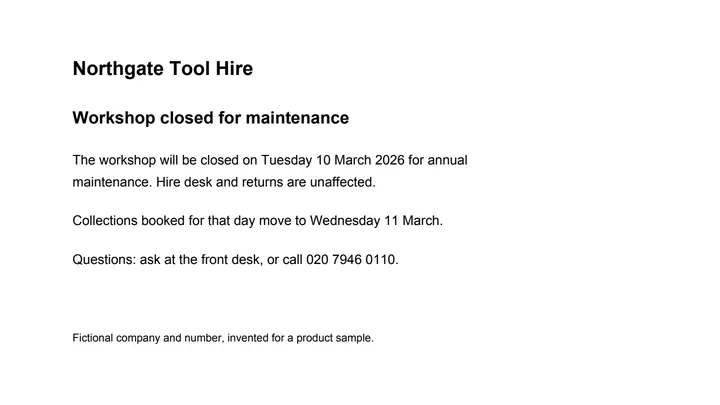
The notice in Bengali, line for line; the company name, the dates' digits and the phone number as written.
 (opens the sample PDF in a new tab)
The notice in English: a heading, two short paragraphs and a phone number.
রক্ষণাবেক্ষণের জন্য ওয়ার্কশপ বন্ধ
বার্ষিক রক্ষণাবেক্ষণের জন্য ওয়ার্কশপ মঙ্গলবার 10 মার্চ 2026 বন্ধ থাকবে।
ভাড়ার ডেস্ক এবং জিনিস ফেরত দেওয়ার কাজে এর কোনো প্রভাব পড়বে না।
কোনো প্রশ্ন থাকলে ফ্রন্ট ডেস্কে জিজ্ঞাসা করুন, অথবা 020 7946 0110 নম্বরে ফোন করুন।
What this tool does
Choose a PDF and get the same file back in Bengali. Each page is read as text and translated by an AI model a page at a time, and each line is written back where it was, set in Noto Sans Bengali at the size and weight of the original, with the conjuncts and vowel signs shaped properly. Pictures, tables, lines and everything else on the page are copied from your file unchanged. Numbers, amounts, dates' digits, codes such as a GSTIN, PAN or invoice number, email addresses, web addresses and phone numbers stay exactly as written — digits stay 0–9 rather than Bengali numerals — and so do company and brand names; where they sit inside a Bengali line they keep a Latin font. A line that is too long may be set slightly smaller, spread into free space beside it or re-wrapped within its paragraph; a line that still does not fit stays in the original language and is marked, rather than spilling over the layout. The language your document is in is worked out for you, and a page that could not be translated is not charged. A scanned PDF is handed to the scanned translator before anything is priced. The PDF you download says in its metadata that it was edited with AI, with a signed provenance manifest beside it; there is no visible mark on the pages.
The edited file is an AI-manipulated version of your document. It is marked as AI-edited in its metadata; using it to misrepresent a real document is prohibited by our rules.
What our sample notice looked like in Bengali
We ran this page on a six-line English notice (recorded on 24 September 2026). At the same size the Bengali took almost exactly the width of the English, 1% less in all; the longest line, the one with the phone number, was 19% wider.
- Sentences end with the dari (।), the Bengali full stop.
- The month stayed in English in both dates: 10 March 2026, and 11 March-এ with the Bengali ending joined by a hyphen. The model may translate a month's name or keep it; the digits are always kept.
- Hire desk and returns were written in Bengali letters (হায়ার ডেস্ক, রিটার্ন) rather than translated.
- Noto Sans Bengali has no Latin digits, so the dates and the phone number are drawn in the page's own Latin font, inside the Bengali line.
What happens to your file
Deleted from our servers after 2 hours. We do not train AI on your files, and the terms of our AI providers do not allow them to; they may keep request logs for up to 55 days, longer for a request they flag for abuse.
Uploads and outputs are deleted after 2 hours, whether or not you download them. Provider request logs are kept for at most 55 days. Details on the privacy page.
Questions
What stays in English, and what happens to numbers and dates?
Numbers, amounts, codes such as a GSTIN, PAN, IFSC, invoice or account number, email and web addresses and phone numbers stay exactly as written, and so do company and brand names. Dates keep their digits and their order, and the month's name may be translated or left in English — our recorded run kept "10 March 2026" — and the digits stay the 0–9 of the original rather than Bengali numerals, so a figure reads the same to anyone who checks it. People's and places' names are written in Bengali script. A line whose Bengali would change a number or a code is kept in English and marked in the result.
Will the Bengali fit, and will it look right?
Each line is set in Noto Sans Bengali, regular or bold to match the original, with the conjuncts and vowel signs shaped as they should be; codes, names and digits that stay as written keep a Latin font. A line that is too long is set slightly smaller, spread into free space beside it or re-wrapped within its paragraph, and then asked for once more in fewer words. If it still does not fit, it stays in English and is marked. Nothing spills over a border or onto the line below.
How good is the Bengali?
It is a machine translation into standard written Bengali, in the register of the original: a notice stays a notice and a form label stays a label, and nothing is added or explained. It is good for understanding a document and for everyday notices and letters. For anything legal, medical or official, have the Bengali checked by someone who reads it well — the result lists every translated line beside its original, page by page, so it is quick to check.
What does it cost?
3 credits a page for a PDF with text in it, and 5 credits a page for a scanned PDF, which the scanned translator handles. The price is shown before anything runs, and a page we could not translate is left as it was and not charged. You need a free account to run it — new accounts get 20 credits.
What happens to the file I upload?
It is deleted from our servers after two hours, whether or not you download the result, and it is not used to train anything. The text of each page goes to the AI provider that translates it; they do not train on it and keep request logs for at most 55 days, longer only for a request they flag for abuse. The PDF you download says in its metadata that it was edited with AI and comes with a signed provenance manifest; no visible mark is drawn on the pages. Identity documents, certificates and other papers we may not rewrite are refused before anything runs, and nothing is charged.
Related tools
- Translate a PDF, keeping the layoutGet the same PDF back in English, Hindi, Kannada, Tamil and more: every line translated where it stands, with numbers, dates and codes kept as written.
- Translate a PDF to Hindi, keeping the layoutTurn an English PDF into Hindi (हिन्दी) without rebuilding it: every line is translated where it stands, in a matching Devanagari font, and numbers, dates and codes stay as written.
- Translate a PDF to English, keeping the layoutTurn a PDF in Hindi, Tamil, Bengali, French or another language into English without rebuilding it: every line translated where it stands, numbers and codes kept as written.
- Translate a PDF to Marathi, keeping the layoutTurn an English PDF into Marathi (मराठी) without rebuilding it: every line is translated where it stands, in a matching Devanagari font, and numbers, dates and codes stay as written.
- Translate a scanned PDF, keeping the layoutTranslate a scan or a phone photo of a page: the old words are painted out to match the paper and the translation is set in their place. Numbers and codes stay as written.
Translate a PDF, keeping the layout
- Translate a PDF to Tamil, keeping the layout
- Translate a PDF to Telugu, keeping the layout
- Translate a PDF to Spanish, keeping the layout
- Translate a PDF to French, keeping the layout
- Translate a PDF to German, keeping the layout