Translate a PDF, keeping the layout
Translate a PDF into English, Hindi, Tamil and more, and get the same PDF back: every line translated where it stood, in a matching font, with the pictures, tables and numbers left as they were.
Free account · 20 free credits. Sign up to run it.
Drop a PDF here
PDF · one file
or paste it here (Ctrl+V)
Nothing is uploaded until you press Translate the PDF.
How to translate a PDF
- Sign in, or make a free account, then choose your PDF and the language to translate it into. You do not say what language it is in: that is worked out from the page.
- Press “Translate the PDF” to see the price before anything runs — 3 credits a page for a PDF with text in it — then confirm to start. Nothing is charged before you confirm.
- Download the translated PDF. A table lists each page as translated, partly translated or left in the original, and a page left in the original is not charged.
Before and after
Every line translated where it stands; the company name, the dates' digits and the phone number as written.
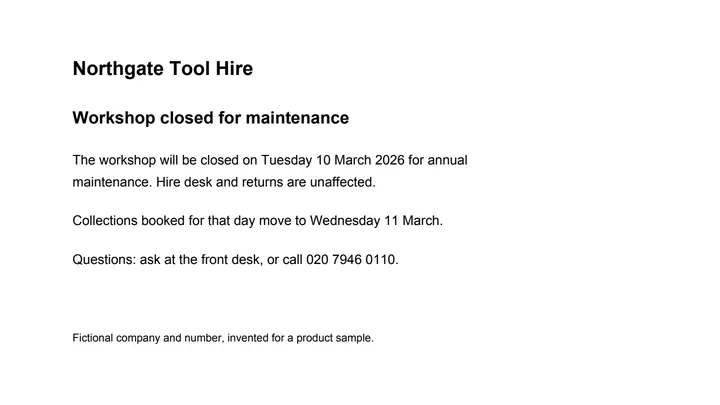 (opens the sample PDF in a new tab)
The notice in English: a heading, two short paragraphs and a phone number.
रखरखाव के लिए वर्कशॉप बंद
वार्षिक रखरखाव के लिए वर्कशॉप मंगलवार 10 मार्च 2026 को बंद
रहेगी। किराया डेस्क और सामान की वापसी पर इसका कोई असर नहीं पड़ेगा।
कोई प्रश्न हो तो फ्रंट डेस्क पर पूछें, या 020 7946 0110 पर कॉल करें।
What this tool does
Choose a PDF and the language you want it in. Each page is read as text and translated by an AI model a page at a time, and the translation is written back into the same file: every line stays where it was, in a matching font at the same size and colour, and pictures, tables and everything else on the page are copied from your file unchanged. You do not say what language the document is in; that is worked out from the page. Numbers, amounts, dates, codes such as a GSTIN, PAN or invoice number, email addresses, web addresses and phone numbers are copied exactly as written, never converted or reformatted, and a line whose translation would change one of them is kept in the original instead. Translations often run longer than the original, so a line may be set slightly smaller, spread into free space beside it or re-wrapped within its paragraph; a line that still does not fit stays in the original language and is marked, rather than spilling over the layout. Each page is priced on its own, and a page that could not be translated is not charged. A scanned PDF has no text to read, so it is handed to the scanned translator before anything is priced. Languages written right to left, such as Arabic, Urdu and Hebrew, are not offered yet. The PDF you download says in its metadata that it was edited with AI, carries a unique identifier and comes with a signed provenance manifest; there is no visible mark on the pages.
The edited file is an AI-manipulated version of your document. It is marked as AI-edited in its metadata; using it to misrepresent a real document is prohibited by our rules.
How do you translate a PDF without losing the formatting?
Translate it in place, so each line is swapped for its translation where it stands and the page never has to be rebuilt. That is how this tool works: the words go back in a matching font at the same size and colour, and pictures, lines and tables are copied from your file unchanged.
Numbers keep their grouping and digits as written, so 1,23,456.00 is still 1,23,456.00 in Hindi. The digits and order of every date, codes such as a GSTIN, PAN or IFSC, email and web addresses and phone numbers are copied exactly too: a month's name may be translated, but no date is turned into another format.
The hard part is length, because a translation often runs longer than the original. A line that does not fit is set slightly smaller, spread into free space beside it, re-wrapped within its paragraph or reworded more briefly; one that still does not fit stays in the original language and is marked, rather than spilling over the layout.
Copying the text into a translator gives you the words without the page, and converting the PDF to Microsoft Word first can move things: Microsoft notes that a PDF opened in Word might not look exactly as it did.
| This tool | Copying the text into a translator | Converting to Word first | |
|---|---|---|---|
| What you get back | The same PDF, each line translated where it stood | Translated text, to lay out again yourself | A Word file to translate, then save as a PDF again |
| Pictures, tables and lines | Copied from your file unchanged | Left behind: only the words are copied | Converted by Word, which may not match the PDF exactly |
| Numbers, dates and codes | Copied as written; a line whose translation would change one stays in the original | As the translator returns them | As the translator returns them |
| Left for you to do | Check the lines marked as kept in the original | Rebuild the page around the new text | Fix anything the conversion moved |
Can you translate a scanned PDF?
Yes, with the scanned PDF translator: it reads each page with OCR, paints out the old words to match the paper and sets the translation in their place, at 5 credits a page.
A scan, a photocopy or a phone photo saved as a PDF is a picture of the page, with no text in it to translate. To tell which kind you have, open the PDF and try to select a word: if you can, it has text, and it can be translated here. Every file is checked before anything is priced: a scan is handed to the scanned translator with the language you picked, and your file goes with it.
Some older Hindi PDFs typed in fonts such as Kruti Dev look right but store their letters as Latin characters, so their text cannot be read either. Such a page is left as it was and not charged, and the scanned translator can read it as a picture instead.
How accurate is AI PDF translation?
No machine translation is right every time, so treat the result as a translation to check, not a certified one: before you rely on it for anything that matters, have someone who reads both languages look it over.
Each page is translated by an AI model with the whole page in view, and running text a paragraph at a time rather than line by line. The model is told to translate the meaning and keep the tone, so a notice stays a notice and a label a label, and to add, explain or leave out nothing.
- The result lists every page as translated, partly translated or left in the original, with the reason, and marks each line kept in the original, so you know where to look.
- Names of people and places written in another script are spelled out in the new one, not translated; company and brand names stay as written.
- A page that is already in the language you chose is left as it is and not charged.
- It translates into one language a run. For the same PDF in two languages, run it once for each; each run is priced on its own.
What happens to your file
Deleted from our servers after 2 hours. We do not train AI on your files, and the terms of our AI providers do not allow them to; they may keep request logs for up to 55 days, longer for a request they flag for abuse.
Uploads and outputs are deleted after 2 hours, whether or not you download them. Provider request logs are kept for at most 55 days. Details on the privacy page.
Questions
Which languages can it translate into?
Hindi, Bengali, Marathi, Tamil, Telugu, Gujarati, Kannada, Malayalam, Punjabi and Odia, and English, French, German, Spanish, Italian, Portuguese and Russian. You do not say what language your document is in: that is worked out from the page, so a Hindi or Tamil PDF can come back in English, for example. Languages written right to left, such as Arabic, Urdu and Hebrew, are not offered yet, because a page cannot be laid out correctly in them.
Is it free, and do I need an account?
You need a free account — new accounts get 20 credits — and each page is paid for in credits: 3 credits a page for a PDF with text in it, and 5 credits a page for a scanned PDF or a photo of a page, which the scanned translator handles. The price is shown before anything runs, and a page is charged only if it was translated: a page we could not translate is left as it was, not charged, and named in the result.
How many pages can I translate at once?
A PDF with text in it can have up to 100 pages and 50 MB, one PDF a run; until your account has bought credits, the limit is 20 pages. For a longer document, cut it into parts with Split PDF, which works in your browser without uploading anything, and translate the parts one by one.
Can I translate a certificate, mark sheet or ID card?
No: this tool refuses identity documents such as government IDs, passports and licences, currency, documents carrying an official seal or stamp, court and police papers, prescriptions and medical records, and degrees, mark sheets and certificates from real institutions. It rewrites the document itself, and a passport with its words changed is still a passport, so a classifier checks every file before anything runs and refuses these; nothing is charged. You can still extract the text of such a document with PDF to Excel, and for a translation to hand in with an application, ask a certified translator.
Is it safe to upload a confidential PDF?
It is deleted from our servers after two hours, whether or not you download the result, and it is not used to train anything. The text of each page goes to the AI provider that translates it; they do not train on it and keep request logs for at most 55 days, longer only for a request they flag for abuse. The PDF you download says in its metadata that it was edited with AI, carries a unique identifier and comes with a signed provenance manifest you can check with any C2PA reader. The signature is self-issued today, so it proves the file has not been altered since we signed it, not who we are. No visible mark is drawn on the pages.
Related tools
- Translate a PDF to Hindi, keeping the layoutTurn an English PDF into Hindi (हिन्दी) without rebuilding it: every line is translated where it stands, in a matching Devanagari font, and numbers, dates and codes stay as written.
- Translate a PDF to English, keeping the layoutTurn a PDF in Hindi, Tamil, Bengali, French or another language into English without rebuilding it: every line translated where it stands, numbers and codes kept as written.
- Translate a PDF to Tamil, keeping the layoutTurn an English PDF into Tamil (தமிழ்) without rebuilding it: every line is translated where it stands, in a matching Tamil font, and numbers, dates and codes stay as written.
- Translate a PDF to Bengali, keeping the layoutTurn an English PDF into Bengali (বাংলা) without rebuilding it: every line is translated where it stands, in a matching Bengali font, and numbers, dates and codes stay as written.
- Translate a scanned PDF, keeping the layoutTranslate a scan or a phone photo of a page: the old words are painted out to match the paper and the translation is set in their place. Numbers and codes stay as written.
- Edit the text in a PDFSay what should change — a date, a name, a price — and get the same PDF back with those words rewritten in place, matching the font. Removed from our servers after 2 hours.
- Split a PDF into separate filesSplit a PDF into single pages, into files of a few pages each, or by page ranges like 1-3, 5, 8-10. It happens on your own device: the PDF is never uploaded.
- Convert a PDF table to ExcelExtract the tables from a PDF into Excel, every value in its own cell, merged cells kept and doubtful cells flagged. Your file is deleted after two hours.
Translate a PDF, keeping the layout
- Translate a PDF to Telugu, keeping the layout
- Translate a PDF to Marathi, keeping the layout
- Translate a PDF to Spanish, keeping the layout
- Translate a PDF to French, keeping the layout
- Translate a PDF to German, keeping the layout
Edit a document
Guides and free sample files
- How to translate a scanned PDF and keep the layout · guide
- Sample PDF for translation testing · free sample file