Edit the text in a PDF
To edit the text in a PDF, open it here and say what should change, such as a date, a name or a price. We rewrite those words where they are, matching the font, size and colour, and leave the rest as it was.
Edit the text in a PDF
Drop a PDF here
It opens on this page. Click any words to change them, or say what should change.
PDF · one file
or paste it here (Ctrl+V)
Nothing is uploaded until you make a change with the AI, or download.
How to edit the text in a PDF
- Choose your PDF, on a phone or a computer. It needs real text, the kind you can select in a PDF reader; a scan is spotted before anything is charged, and the scanned editor is offered instead.
- Say what should change. Click the line on the page and type the change in a few words, or write one instruction such as “Change 10 March to 12 March”. Several changes can go in one run.
- Sign in with a free account, check the price and run it. Look over the before-and-after view, then download the PDF. Your upload and the result are deleted from our servers after 2 hours.
Before and after
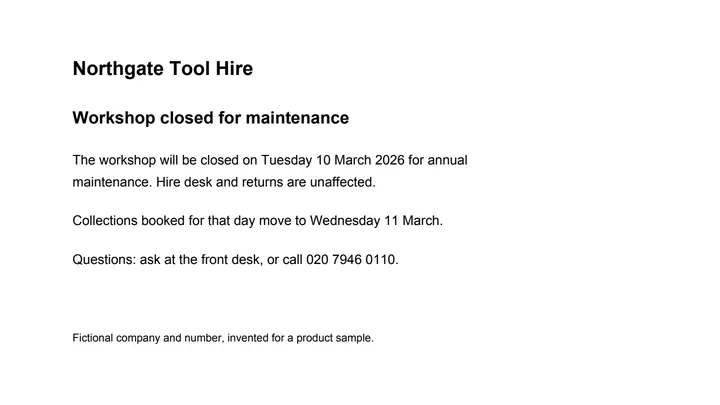
One instruction, two text runs rewritten, nothing else in the file touched.
 (opens the sample PDF in a new tab)
The dates that change: Tuesday 10 March and Wednesday 11 March 2026.
The workshop will be closed on Thursday 12 March 2026 for annual
maintenance. Hire desk and returns are unaffected.

Collections booked for that day move to Friday 13 March.
What this tool does
This tool changes wording inside a PDF without rebuilding the document. You upload the file, type one line saying what should be different, and it finds the text runs that match, replaces them, and writes the file back out. The font, size, colour and position are taken from the original run; if the new words do not fit the space, the text is tightened slightly and then wrapped inside the same block rather than spilling over the layout. Everything you did not ask to change is copied from your file unchanged, not regenerated. You get a before-and-after view showing which regions were touched, with a confidence figure for each one. The PDF you download is marked as AI-edited in its metadata, carries a unique identifier, and comes with a signed provenance manifest you can download beside it; our provenance signature is self-issued today, so it proves the file has not been altered since we signed it rather than proving who we are. If the page you edit shows a real person, place or event, the PDF you download has been changed by AI and carries that machine-readable mark saying so — tell anyone you pass it to.
The edited file is an AI-manipulated version of your document. It is marked as AI-edited in its metadata; using it to misrepresent a real document is prohibited by our rules.
Can I edit the text in a PDF for free?
You can add to a PDF for free, but changing the words already in it costs credits here. Many free online editors work by adding: a new text box on top, or a white box over the old words with the new ones typed over it. Changing the words themselves is often kept for a paid plan or a small number of free tasks.
On this site, Add text to a PDF is the free way to add. It puts text, white-out, highlights, ticks, the date, a signature or a picture on the page in your browser, and nothing is uploaded. This editor is for changing the words that are already there, in their own place and style.
| What differs | This editor | Add text to a PDF (free) |
|---|---|---|
| What it does | Rewrites the words you name, where they are on the page | Adds text, white-out, highlights, ticks, a date, a signature or a picture on top |
| The old words | Replaced in the file itself | Stay in the file: white-out hides them on the page, but they may still be in its text layer |
| Font | Taken from the words being replaced | Helvetica for English text, in the size and colour you choose |
| Cost | 5 credits a job of up to 10 pages, with a free account | Free, with no account |
| Your file | Uploaded, then deleted after 2 hours | Stays in your browser; nothing is uploaded |
Why can't I edit the text in my PDF?
Usually because the PDF is a scan, or because it is locked. This page tells you which, and none of these costs you anything.
- It is a scan or a photo of a page. There are no words in it to change, only a picture of them, so it needs the scanned editor, which this page offers when it spots one.
- It asks for a password to open. Take the password off first (Unlock a PDF on this site does it in your browser, with the password you were given), then upload it again.
- It opens, but is protected against changes. The editor stops and says so; Unlock a PDF lifts that restriction with nothing to type.
- Its text is drawn one letter at a time, as some PDFs are. Those pages cannot be edited as text yet.
Do I need to convert a PDF to Word to edit it?
No. This editor changes the words inside the PDF itself, so you get the same PDF back, with everything you did not ask to change copied across as it was.
Converting to Word makes an editable copy instead. Microsoft's own help for Word says a converted PDF may not look exactly like the original, and that lines and pages can break in different places. That is worth it for a bigger rewrite, such as whole paragraphs, and Convert PDF to Word on this site makes the .docx for you. For a date, a name, a figure or a line, changing it in the PDF keeps the rest of the page as it was.
What happens to your file
Deleted from our servers after 2 hours. We do not train AI on your files, and the terms of our AI providers do not allow them to; they may keep request logs for up to 55 days, longer for a request they flag for abuse.
Uploads and outputs are deleted after 2 hours, whether or not you download them. Provider request logs are kept for at most 55 days. Details on the privacy page.
Questions
Do I need an account, and what does it cost?
Yes, a free account, and editing costs credits. A job is 5 credits and covers up to 10 pages; each page after that adds 0.5 credits, and the total is rounded up to a whole credit. Signing up is free, and new accounts get 20 credits. The price is shown before anything runs, and a run that fails or is refused is not charged. A PDF can be up to 50 MB, with up to 50 pages until you have bought credits and up to 300 after that. The file you download has no watermark on its pages; its metadata says it was edited with AI.
Will the new text be in the same font and place?
Usually, and the result tells you when it is not. If the PDF holds every letter the new words need, its own font is reused. Many PDFs hold only the letters that were on the page, so a new letter can be missing; then we use the same font from our library of open-licence fonts, or one with the same letter widths, or the nearest visual match, and that last case is flagged as approximate. If the new words do not fit the space, letter spacing and size are adjusted by up to a few per cent, then the text is re-wrapped inside the same block; if it still does not fit, the job stops and tells you rather than letting text run over a border. Every changed region in the result names which of these happened to it.
Can I edit the text in a scanned PDF?
Yes, with the scanned editor rather than this one. A scan has no text to rewrite, only a picture of the words, so the page has to be read with OCR, the old words painted out and the new ones typeset in their place. When you upload a scanned PDF here, the page spots it before anything is charged and offers to send the same file to the scanned PDF editor, listed under Related tools below. That is a separate tool with its own price, 8 credits a job, because it costs more to run.
Which documents will you refuse to edit?
Identity documents and other papers that could be passed off as genuine: government IDs such as Aadhaar, PAN and voter ID, passports, driving and other licences, currency, anything with an official seal or stamp, court and police documents, prescriptions, medical records, certificates, and degrees or mark sheets from real institutions. A classifier checks every document before an edit runs and refuses the edit when it recognises one of these. On those files you can still extract, redact or translate, and the refusal message says so.
What happens to the PDF I upload?
It is deleted from our servers after 2 hours, and so is the edited copy, whether or not you download it; neither is used to train anything. To work out which words to change, the text of the page and your instruction may be sent to an AI provider, which does not train on them and keeps request logs for at most 55 days, longer only for a request it flags for abuse.
Related tools
- Edit the text in a scanned PDFChange wording on a scan: the old words are painted out to match the paper and the new ones are typeset in a matching font. Your file is deleted after two hours.
- Add text, a signature or a picture to a PDF — freeType anywhere on a PDF, white-out, highlight, draw, tick a box, add the date, your signature or a picture, and download it with everything drawn in. Free, in your browser; nothing is uploaded.
- Convert PDF to WordTurn a PDF into an editable Word (.docx) file with its fonts, colours and tables. Pages with text are free with a free account; a scanned page is 1 credit.
- Translate a PDF, keeping the layoutGet the same PDF back in English, Hindi, Kannada, Tamil and more: every line translated where it stands, with numbers, dates and codes kept as written.
- Unlock a PDF — remove a password you know, or its restrictionsTake the password off a PDF you can open — a bank statement, an e-Aadhaar — or lift its print and copy restrictions. It happens on your device: nothing is uploaded, and nothing is guessed.
- Convert a PDF table to ExcelExtract the tables from a PDF into Excel, every value in its own cell, merged cells kept and doubtful cells flagged. Your file is deleted after two hours.
Edit the text in a PDF, a poster or an invitation
Edit a document
Guides, sample files and comparisons
- Can you edit the text in a scanned PDF? · guide
- How to change a date or an amount in a PDF · guide
- Sample invoice PDF · free sample file
- filedone vs Adobe Acrobat · comparison
- filedone vs Sejda · comparison