Add text, a signature or a picture to a PDF — free
Drop a PDF here
It opens on this page. Pick a tool, then click on the page to type, cover with white, sign or add a picture.
PDF · one file
No file to hand?
or paste it here (Ctrl+V)
Nothing is uploaded: it all happens in this browser.
Before and after
The same form, filled in.
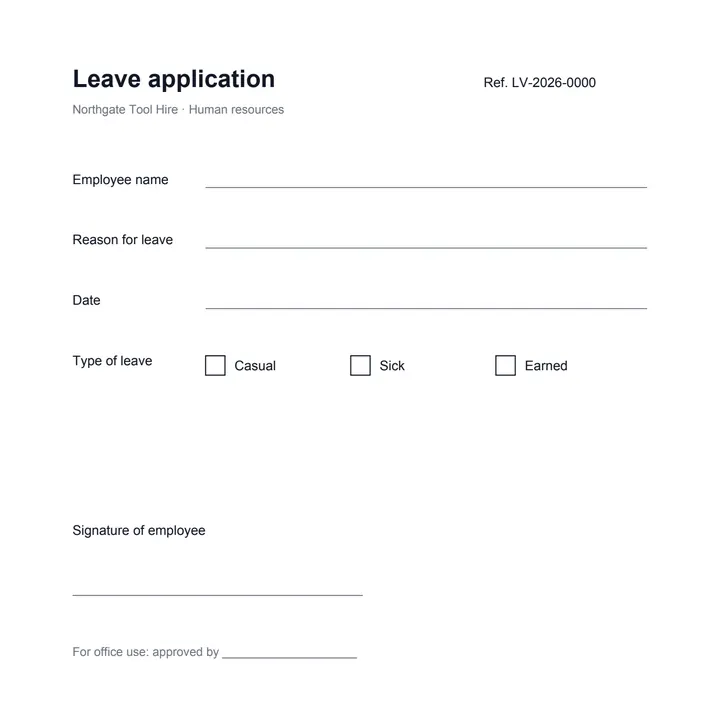 (opens the sample PDF in a new tab)
The invented leave form, empty
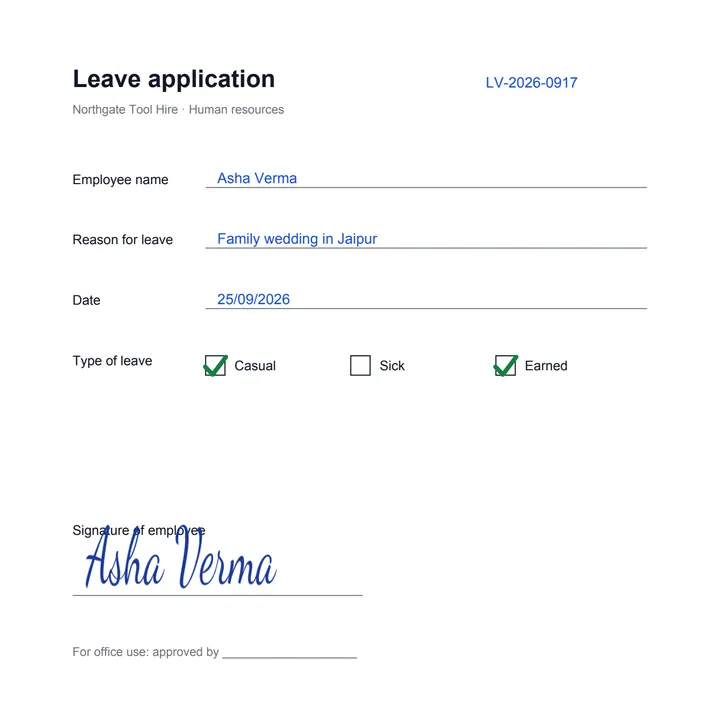 (opens the recorded result in a new tab)
Name, reason and date typed on the lines, two boxes ticked, the signature drawn in, the old reference number whited out.
What this tool does
Choose a PDF of up to 50 MB and 300 pages. It opens large on this page. Pick a tool and click or drag on the page: Text puts words where you click, in the size and colour you choose; Erase covers a box with white, as white-out does; Shapes draws a rectangle or an ellipse; Picture places a PNG or JPEG; Sign draws, types or uploads your signature; and under More, Highlight tints a box, Draw follows your finger, pen or mouse, Tick and Cross place a mark, and Date puts today's date in, ready to change. Drag anything to move it, drag its corner to resize it, press Delete to remove it, and undo as often as you like. Download writes it all into the pages themselves, not as a comment layer someone can switch off. Everything happens in your browser: the file is not uploaded, and no other mark is added. Need to change words already on the page? Ask AI, on the same toolbar, is the AI editor on the same file.
What happens to your file
Your file never leaves your device: this page opens it, changes it and saves the result in your browser, and nothing is uploaded. Only an AI action uploads it, when you run one, and its price is shown first.
Your file is uploaded to our server only when you make the AI change, and it is deleted there after 2 hours. Until then, and for what you add yourself, it stays in your browser.
Your file was uploaded to our server for the change you made there, and it is deleted there after 2 hours, whether or not you download anything. What you add by hand is still made in your browser.
No AI provider sees it unless you run an AI action. The page sends us one count that a run happened — no file, no name, no size. Details on the privacy page.
An AI action sends the file on to an AI provider to make the change, and we do not use files for training. Uploads and outputs are deleted after 2 hours, whether or not you download them. Provider request logs are kept for at most 55 days. Details on the privacy page.
Questions
Is this really free, and is my PDF uploaded?
Free, with no sign-up and no watermark. The PDF is drawn and changed in your browser with pdf.js and pdf-lib, downloaded from this site when you choose the file. The only thing we are told is that a run happened — not the file, its name or what you added. The AI editor on the same screen (Ask AI, on the toolbar) is the paid part: it uploads the file when you press Run, shows the price first, and never runs without you pressing it.
Can I change words that are already in the PDF?
Not with these tools: they add to the page. To cover a word, use Erase (a white-out) and type the new one over it — the way a form is corrected on paper. To change the words themselves, in the same font and place, choose Ask AI on the toolbar above the page: that is the AI editor, priced per run and shown before anything is spent.
Can someone remove what I added?
Not by a reader: everything is drawn into the page's own content, not left as a comment or a form field that can be hidden or dragged away. Someone with a PDF editing program can still edit page content, as with any PDF. A white-out covers the words underneath it in the picture of the page, but the words may still be in the file's text layer; to remove private numbers for good, use Redact a PDF.
Can I type in Hindi, or use the rupee sign?
Yes. English and Western European letters, digits and common punctuation are written as real text in the PDF's own Helvetica, sharp at any zoom and searchable. Words in Hindi or another script, or with the ₹ sign, are drawn as a picture in your device's font, at the size and place you set.
Does it work on a phone?
Yes. Every tool is a big button, a finger draws and signs, pinch to zoom the page, and drag anything you added to move it. The controls sit under the page on a narrow screen. Nothing is uploaded, so it works the same on a slow connection.
Related tools
- Sign a PDF — draw, type or upload your signaturePut your signature and the date on any page of a PDF: draw it with a finger or a mouse, type your name in a handwriting font, or upload a photo of it. Free, and nothing is uploaded.
- Redact a PDF — remove Aadhaar, PAN and account numbers for goodBlack out Aadhaar, PAN, IFSC, account and card numbers, phones and emails in a PDF, or any word, area or page. Marked text is removed from the file, not covered, and the PDF is never uploaded.
- Edit the text in a PDFSay what should change — a date, a name, a price — and get the same PDF back with those words rewritten in place, matching the font. Removed from our servers after 2 hours.
- Convert PDF to WordTurn a PDF into an editable Word (.docx) file with its fonts, colours and tables. Pages with text are free with a free account; a scanned page is 1 credit.
- Add a watermark to a PDF — words or a logoStamp CONFIDENTIAL, DRAFT, your name or your logo on every page of a PDF — once across the middle or tiled — in the size, colour, angle and see-through you choose. Nothing is uploaded.
Write on it
Guides, sample files and comparisons
- How to edit a scanned PDF without retyping it · guide
- How to change a date or an amount in a PDF · guide
- Sample fillable PDF form · free sample file
- filedone vs Adobe Acrobat · comparison