Sample fillable PDF form
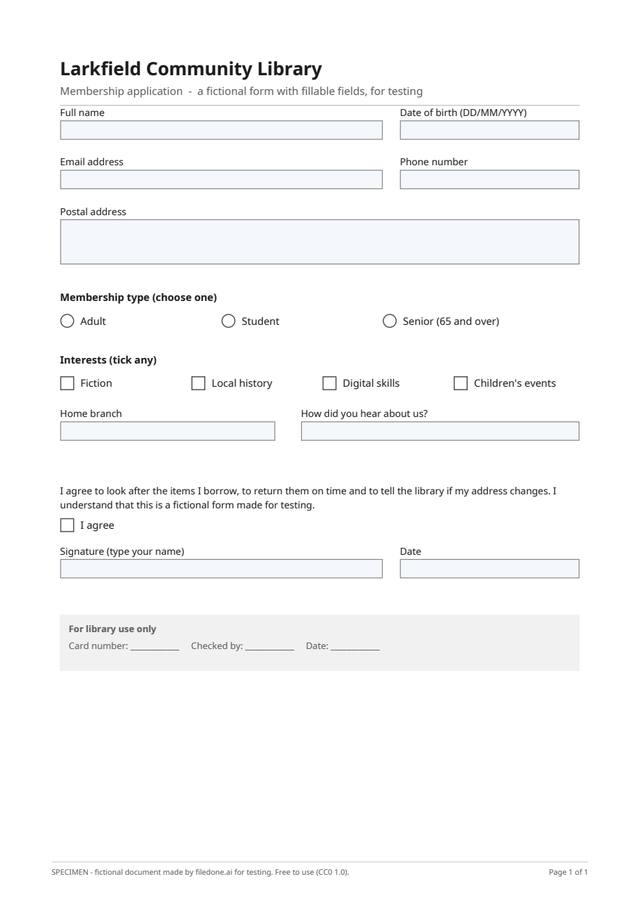
This is a one-page PDF form with real fillable fields — the interactive kind, not lines to write on. It has fifteen fields of the types forms actually use: single-line and multi-line text, a group of radio buttons, checkboxes, a drop-down list and a box limited to ten characters.
1 pagePDF 47 KBreal text layerCC0
Download
- sample-fillable-form.pdfPDF, 1 page, with a text layer · 47 KBDownload PDF
Free, no sign-up. Released under CC0 1.0: copy it, change it and use it anywhere.
What is in the file
A membership application for a fictional library: name, date of birth (at most 10 characters), email, phone, a multi-line postal address, membership type (radio buttons, "Adult" chosen by default), four interest checkboxes, a home-branch drop-down, an agreement checkbox, a typed signature and a date.
Field names are plain (full_name, date_of_birth, membership_type…), so a script that fills the form by name can be tested against it too.
The facts
Measured from the file itself by the script that made it.
| Pages | 1 |
|---|---|
| Files | sample-fillable-form.pdf (47 KB) |
| Text layer | Yes: the words are real, selectable text |
| Page size | A4 (210 × 297 mm) |
| Form fields | 15: 8 text boxes, 1 group of 3 radio buttons, 5 checkboxes, 1 drop-down |
| Language | English |
| Fictional | Everything: every company, person, address, number and figure is invented, and every page says SPECIMEN |
| Licence | CC0 1.0 (public domain) |
What to test with it
- Type into it, tick the boxes and download it filled in with Fill in a PDF form, free in your browser.
- Add a drawn signature where the form has none with Sign a PDF.
- Write on it as if it were flat with Add text to a PDF.
- Put a password on the filled-in copy before you send it with Protect a PDF.
Licence, and who is in it
Nobody. Every company, person, address, account number and figure in the file was made up by the script that drew it, and every page carries the word SPECIMEN and a line saying it is fictional; the PDF's metadata says so too. The file is dedicated to the public domain under CC0 1.0, so you can use it in tests, demos, courses and products without asking. Last updated 8 October 2026.
Questions
Will the form work in any PDF reader?
It uses standard AcroForm fields, the kind desktop PDF readers and the PDF viewers built into browsers can usually fill. How each viewer draws the radio buttons and checkboxes differs a little, which is itself worth testing.
Does the form send my answers anywhere?
No. It has no submit button and no script. Whatever you type stays in your copy of the file.
Can I use this file in my own tests, product or course?
Yes. It is released under CC0 1.0, a public-domain dedication: copy, change, redistribute and use it commercially, with no need to ask and no need to credit filedone (a link is welcome).
Is anything in it real?
No. Every company, person, address, account number, tax number and figure was invented by the script that made the file. Every page says SPECIMEN and that it is fictional, and so does the PDF's metadata.
Open it in
- Fill in a PDF form — type your answers, tick the boxesType into the fields of a fillable PDF form, tick its boxes and pick its options, then download it filled in and flattened. Free, and the file stays on your device.
- Sign a PDF — draw, type or upload your signaturePut your signature and the date on any page of a PDF: draw it with a finger or a mouse, type your name in a handwriting font, or upload a photo of it. Free, and nothing is uploaded.
- Add text, a signature or a picture to a PDF — freeType anywhere on a PDF, white-out, highlight, draw, tick a box, add the date, your signature or a picture, and download it with everything drawn in. Free, in your browser; nothing is uploaded.
- Protect a PDF with a password (AES-256)Lock a PDF with a password before you email or upload it, and stop printing, copying or changes if you want. AES-256, done on your own device: the file and the password never leave it.