Sample scanned invoice
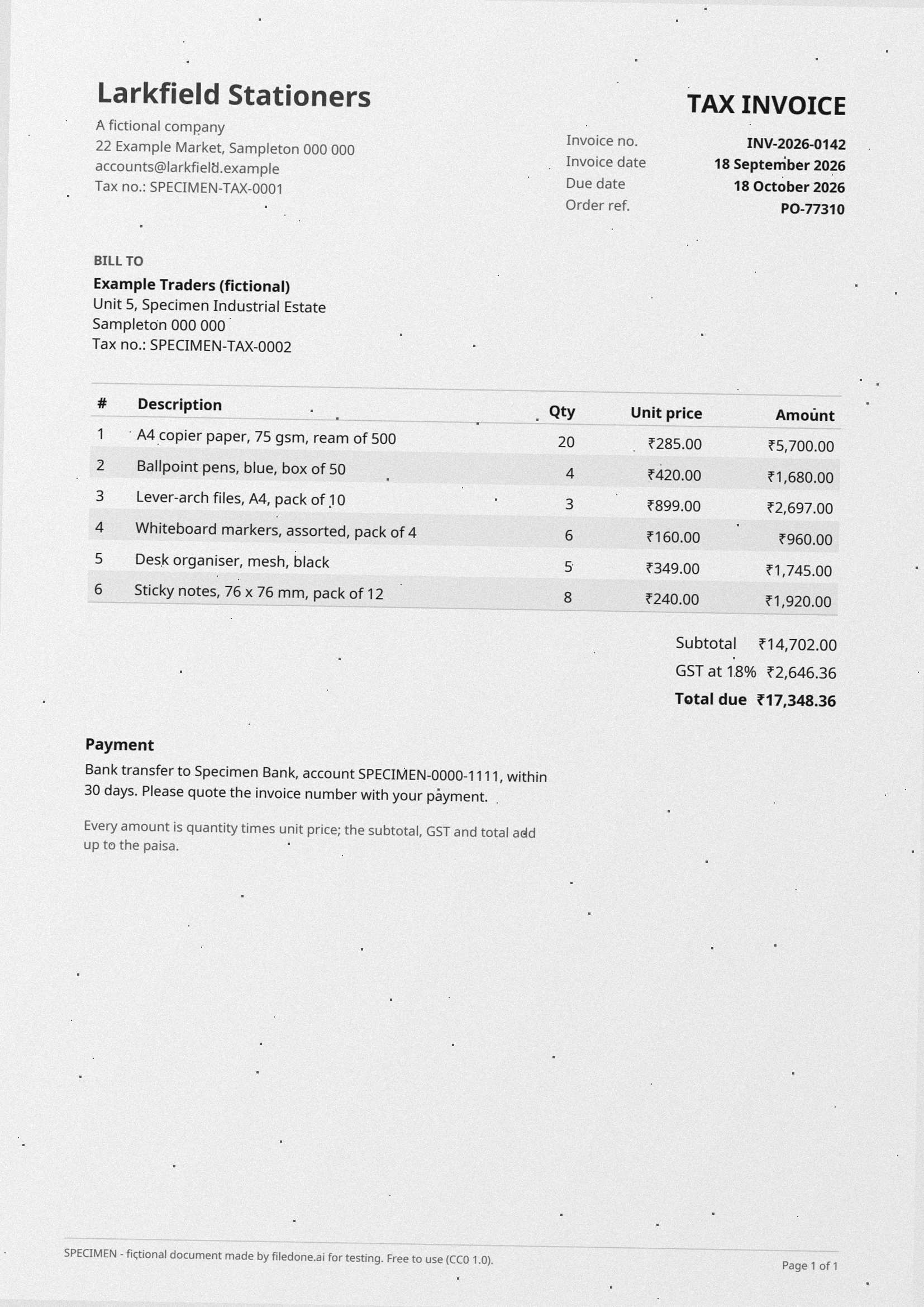
This is the sample invoice turned into a scan: the same six line items and the same totals, rendered at 200 dpi in grayscale, turned 1 degree, with grain and dust, and saved with no text layer. Because the digital original is published beside it, you know exactly what a perfect reading of this scan should return.
1 pagePDF 270 KBimage only, no text layer200 dpiCC0
Try it on this file
Read the text
Opens the tool with this file already in it. Free, and it runs in your browser.
Or: Turn it into Excel (1 credit a page) · Read the PDF scan (free)
Download
- sample-scanned-invoice.pdfPDF, 1 page, image only · 270 KBDownload PDF
- sample-scanned-invoice.jpgJPG, 1654 × 2339 px · 268 KBDownload JPG
Free, no sign-up. Released under CC0 1.0: copy it, change it and use it anywhere. The exact values in it are in the answer key.

Check your results
The exact values in this file, so your parser or OCR can be checked against them. They come from the script that drew it.
| Invoice number and date | INV-2026-0142, 2026-09-18 |
|---|---|
| Line items | 6; the first is "A4 copier paper, 75 gsm, ream of 500", 20 × ₹285.00 = ₹5,700.00 |
| Subtotal, GST, total | ₹14,702.00 + ₹2,646.36 = ₹17,348.36 |
| Text | 31 lines on 1 page, the first "Larkfield Stationers" |
What filedone reads from it
The first lines Image to text returned for sample-scanned-invoice.jpg, as they came out. 159 of the answer key's 181 words came back exactly.
Larkfield Stationers TAX INVOICE
uchonal company Invoice no. INV-2026-0142
22 Example Market, Sampleton 000 000 TAYGIcadate 18 September 2026
accounts@larkfield.example Due date 18 October 2026
Tax no.: SPECIMEN-TAX-0001
is Order ref. PO-77310
BILLTO
Example Traders (fictional)
Recorded on 31 October 2026 with the tool's default settings, on its server version (Tesseract 5.5.3, English model). Your browser runs the same engine with the same settings, so your result can differ slightly. Try it on this file
What is in the file
Everything on the sample invoice PDF is here — letterhead, bill-to block, a six-row table, subtotal, GST and total — but only as pixels. The rupee sign is a known trouble spot: plain OCR often reads it as another symbol.
The facts
Measured from the file itself by the script that made it.
| Pages | 1 |
|---|---|
| Files | sample-scanned-invoice.pdf (270 KB), sample-scanned-invoice.jpg (268 KB) |
| Text layer | None: each page is an image only, so a tool needs OCR to read it |
| Page size | A4 (210 × 297 mm) |
| Resolution | 200 dpi |
| JPG size in pixels | 1654 × 2339 |
| Colour | Grayscale |
| Skew | 1° clockwise |
| Line items | 6 |
| Total | ₹17,348.36 |
| Language | English |
| Fictional | Everything: every company, person, address, number and figure is invented, and every page says SPECIMEN |
| Licence | CC0 1.0 (public domain) |
What to test with it
- Read the line items off the scan into a spreadsheet with Scanned invoice to Excel.
- Copy its text in your browser with Image to text (the JPG) or Scanned PDF to text (the PDF).
- Change the due date on the scan with Edit the text in a scanned PDF.
- Turn the JPG into a table with Screenshot to table.
Licence, and who is in it
Nobody. Every company, person, address, account number and figure in the file was made up by the script that drew it, and every page carries the word SPECIMEN and a line saying it is fictional; the PDF's metadata says so too. The file is dedicated to the public domain under CC0 1.0, so you can use it in tests, demos, courses and products without asking. Last updated 22 October 2026.
Questions
How do I know if a tool read it correctly?
Compare its output with the digital sample invoice PDF, which has the same text as real characters. The six amounts, the subtotal, the GST and the total on this page are listed there.
Why is the rupee sign a problem for OCR?
It is a newer character (added to Unicode in 2010) that many OCR models were not trained on. When we ran this page through Tesseract 5.5 (English model) on 2026-10-01, not one rupee sign came back as ₹: most were read as a percent sign and the rest were dropped. It is a quick check of any reader.
Can I use this file in my own tests, product or course?
Yes. It is released under CC0 1.0, a public-domain dedication: copy, change, redistribute and use it commercially, with no need to ask and no need to credit filedone (a link is welcome).
Is anything in it real?
No. Every company, person, address, account number, tax number and figure was invented by the script that made the file. Every page says SPECIMEN and that it is fictional, and so does the PDF's metadata.
Open it in
- Convert a scanned invoice to ExcelFor invoices that are a scan or a photo. The page is read with OCR and the line items come back as a spreadsheet. Your file is deleted after two hours.
- Image to text — copy the text from a photo, scan or screenshotTurn a photo, scan or screenshot into text you can copy and edit, in English, Hindi, Marathi, Bengali, Tamil or Telugu. Free and on your device; handwriting read by AI for 2 credits.
- Turn a screenshot of a table into ExcelUpload a screenshot or a photo of a table and get the rows and columns back as a spreadsheet you can sort and sum. Your file is deleted after two hours.
- Edit the text in a scanned PDFChange wording on a scan: the old words are painted out to match the paper and the new ones are typeset in a matching font. Your file is deleted after two hours.