Turn a screenshot of a table into Excel
Free account · 20 free credits. Sign up to run it.
Drop your image here
or choose it from your device
PNG, JPG, JPEG, WEBP · up to 1 file per job
or paste it here (Ctrl+V)
Before and after
A screenshot is pixels; there is nothing to select or paste. Reading it turns it into cells.
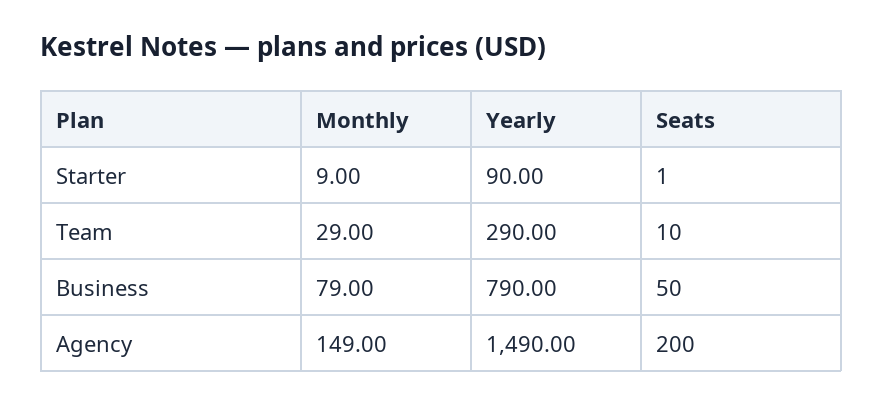 (opens the sample image in a new tab)
There's no text to select — the table is one image.
| Plan | Monthly | Yearly |
|---|---|---|
| Starter | 9.00 | 90.00 |
| Team | 29.00 | 290.00 |
What this tool does
This tool reads a table out of a picture — a screenshot of a web page or a dashboard, a table pasted into a chat, a phone photo of a printout — and gives it back as spreadsheet cells. The image is read with OCR, the row and column boundaries are worked out from where the text sits, and each value goes into its own cell. Nothing is retyped by a person and no number is changed to make a column add up; the cells the reader was least sure about are marked so you can check them. The picture itself is never altered, and nothing in it is used for anything but this one job.
The values in this file were read from your document by AI, and they can be wrong — check them against the original before you rely on them. Your document itself is not altered.
What happens to your file
Deleted from our servers after 2 hours. We do not train AI on your files, and the terms of our AI providers do not allow them to; they may keep request logs for up to 55 days, longer for a request they flag for abuse.
Uploads and outputs are deleted after 2 hours, whether or not you download them. Provider request logs are kept for at most 55 days. Details on the privacy page.
Questions
What kinds of images work?
PNG, JPEG and WebP. A screenshot works best, because the text is sharp and the lines are straight. A phone photo works if the whole table is in frame, flat and in focus; a photo at an angle or in shadow reads worse, and nothing recovers detail the camera never captured.
What happens to the image I upload?
It is deleted from our servers after two hours, whether or not you download the result, and it is not used to train anything. The image is sent to the OCR provider and the AI provider that reads the table grid during the job; they do not train on it and keep request logs for at most 55 days, longer only for a request they flag for abuse.
Why are some cells highlighted in the result?
Those are the ones the reader was least confident about — a blurred digit, a character that is ambiguous at that size. They are marked so you check a handful of cells instead of proofreading the whole table.
What does it cost?
One credit per image, shown before anything runs. Running it needs an account: signing up is free, and new accounts get 20 credits, which is twenty images.
Can I get CSV instead of Excel?
Yes. Excel is the default download here; the result view offers CSV and JSON of the same table, because they are all the same cells written out differently.
Related tools
- Convert a PDF table to ExcelExtract the tables from a PDF into Excel, every value in its own cell, merged cells kept and doubtful cells flagged. Your file is deleted after two hours.
- Convert an HTML table to ExcelUpload a saved web page and get the table back as a spreadsheet, merged cells and all. Your file is deleted after two hours.
Tables & text out of a document
Guides and free sample files
- How to extract a table from a scanned PDF to Excel · guide
- Sample scanned invoice · free sample file
- Sample receipt · free sample file