Convert a bank statement PDF to Excel
Free account · 20 free credits. Sign up to run it.
Drop your PDF here
or choose it from your device
PDF · up to 1 file per job
or paste it here (Ctrl+V)
Before and after
Copying a statement out of a PDF reader runs the columns together and starts again at every page break. The tool keeps the columns and joins the pages.
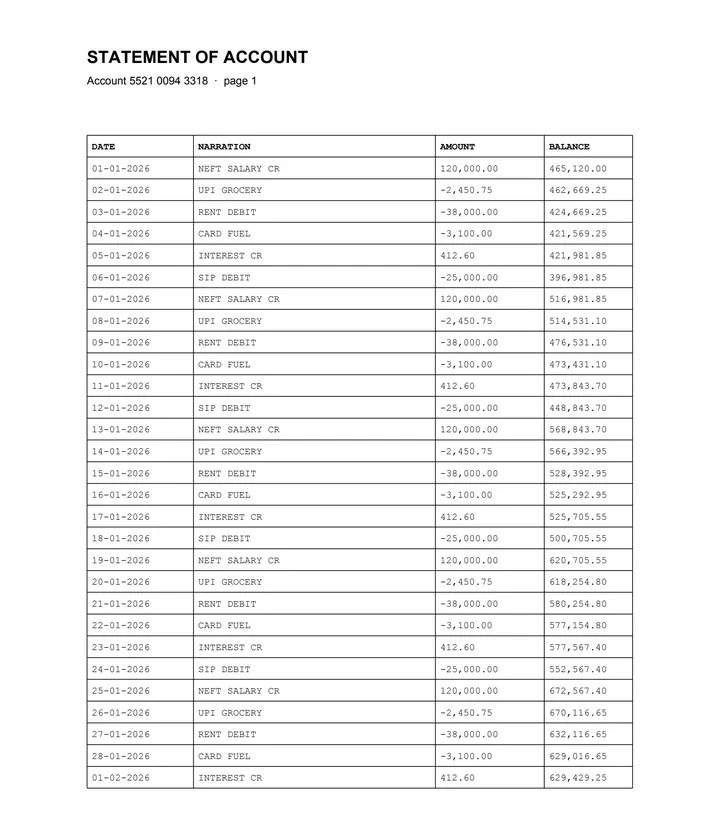 (opens the sample PDF in a new tab)
Copied out, the columns run together: “01-01-2026 NEFT SALARY CR 120,000.00 465,120.00 02-01-2026 UPI…”
| DATE | NARRATION | AMOUNT | BALANCE |
|---|---|---|---|
| 01-01-2026 | NEFT SALARY CR | 120,000.00 | 465,120.00 |
| 02-01-2026 | UPI GROCERY | -2,450.75 | 462,669.25 |
| 03-01-2026 | RENT DEBIT | -38,000.00 | 424,669.25 |
What this tool does
This tool takes a bank statement that was downloaded as a PDF and gives the transaction table back as an Excel file. It reads the text and the positions already stored in the document, works out where the date, narration, debit, credit and balance columns sit, and writes one spreadsheet row per transaction. Statements almost always run over several pages, and where the columns line up the parts are joined into one continuous table instead of one table per page, so you do not have to stitch them yourself. Amounts are kept exactly as they were printed: a figure shown as 1,450.00 comes out as 1,450.00, minus signs and all. Nothing is recalculated and no balance is corrected. Cells the parser was unsure about are marked so you can check those instead of reading the whole statement again.
The values in this file were read from your document by AI, and they can be wrong — check them against the original before you rely on them. Your document itself is not altered.
What happens to your file
Deleted from our servers after 2 hours. We do not train AI on your files, and the terms of our AI providers do not allow them to; they may keep request logs for up to 55 days, longer for a request they flag for abuse.
Uploads and outputs are deleted after 2 hours, whether or not you download them. Provider request logs are kept for at most 55 days. Details on the privacy page.
Questions
What happens to the statement I upload?
It is deleted from our servers after two hours, whether or not you download the result, and it is not used to train anything. While a job runs, parts of the file may be sent to the AI providers we use; they do not train on it and keep request logs for at most 55 days, longer only for a request they flag for abuse. If that is not acceptable for your bank statement, do not upload it — that is a reasonable decision and we would rather say so than talk you out of it.
Will you edit or "clean up" the figures?
No. Extraction copies what is printed and stops there. If a balance column does not add up, you are told and the figures are left alone. This tool only reads your statement: the file you upload is never changed.
My statement is 12 pages. Does the table survive the page breaks?
That is the case it is built for. Where a table continues on the next page with the same columns, the parts are joined into one table and the repeated header is written once. The sample on this page is a two-page statement joined that way, and the result says so.
How accurate is it?
We have not published a number yet, and we are not going to quote one we have not measured. The tool marks the cells it is unsure about, which is the part that actually saves you time.
What if my statement is a scan rather than a downloaded PDF?
Use the scanned bank statement tool instead, listed under Related tools below. Try selecting a line of text in your PDF viewer: if nothing highlights, the page is an image and it has to be read with OCR first, which that tool does. It costs the same, one credit a page.
Related tools
- Convert a scanned bank statement to ExcelFor statements that are a scan, a photocopy or a photo of a passbook page. The transactions come back as a spreadsheet. Your file is deleted after two hours.
- Convert a bank statement PDF to CSVTurn a bank statement PDF into one flat CSV file, one line per transaction, ready for Tally, Zoho Books or a spreadsheet import. Your file is deleted after two hours.
- Convert a bank statement PDF to JSONGet the transactions out of a statement PDF as structured JSON, with a confidence score on every cell. Your file is deleted after two hours.
- Convert a PDF table to ExcelExtract the tables from a PDF into Excel, every value in its own cell, merged cells kept and doubtful cells flagged. Your file is deleted after two hours.
Tables & text out of a document
Guides and free sample files
- Sample bank statement PDF · free sample file