Convert a bank statement PDF to CSV
Free account · 20 free credits. Sign up to run it.
Drop your PDF here
or choose it from your device
PDF · up to 1 file per job
or paste it here (Ctrl+V)
Before and after
Three pages of statement, with the header reprinted on each one, become one CSV with a single header line.
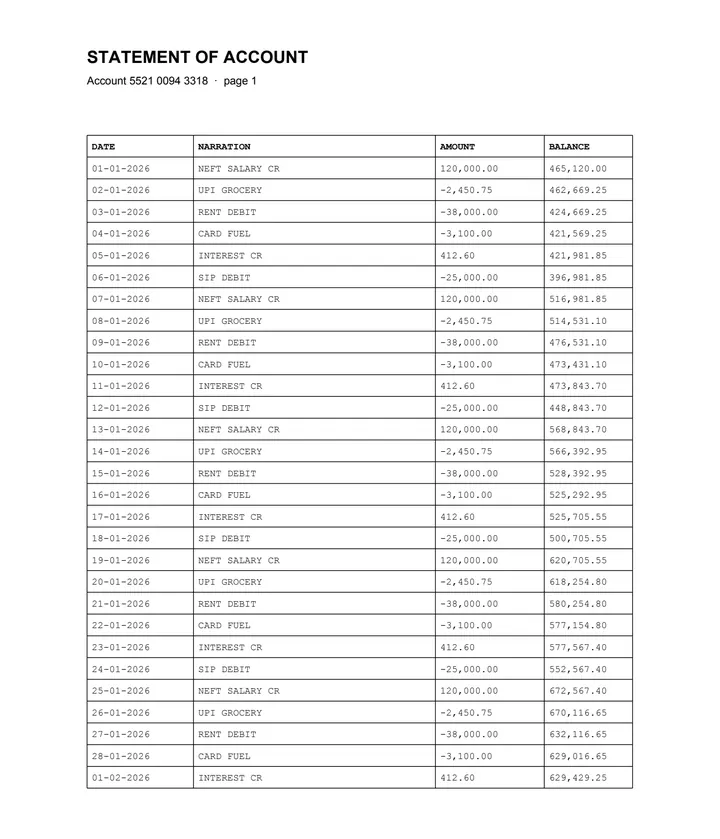 (opens the sample PDF in a new tab)
Page 1 of 3. The header row is printed again on every page: 28 + 28 + 15 rows.
DATE,NARRATION,AMOUNT,BALANCE
01-01-2026,NEFT SALARY CR,"120,000.00","465,120.00"
02-01-2026,UPI GROCERY,"-2,450.75","462,669.25"
... 71 lines, one header
What this tool does
This tool reads the transaction table out of a bank statement PDF and writes it as a single CSV file. It uses the text and positions already inside the document to find the column boundaries, then writes one comma-separated line per transaction. Because accounting software wants one continuous file rather than one block per page, a table that carries on across page breaks is joined back together and the repeated column header is written once at the top, not again at every page. Values are copied exactly as printed, including the thousands separators and the minus signs, and fields containing a comma are quoted so the file opens correctly. Nothing is reformatted into a different date or number style, because guessing wrong about a date format is how a bookkeeping import goes quietly wrong.
The values in this file were read from your document by AI, and they can be wrong — check them against the original before you rely on them. Your document itself is not altered.
What happens to your file
Deleted from our servers after 2 hours. We do not train AI on your files, and the terms of our AI providers do not allow them to; they may keep request logs for up to 55 days, longer for a request they flag for abuse.
Uploads and outputs are deleted after 2 hours, whether or not you download them. Provider request logs are kept for at most 55 days. Details on the privacy page.
Questions
What happens to the statement I upload?
It is deleted from our servers after two hours, whether or not you download the result, and it is not used to train anything. While a job runs, parts of the file may be sent to the AI providers we use; they do not train on it and keep request logs for at most 55 days, longer only for a request they flag for abuse. If that is not acceptable for your bank statement, do not upload it.
Is the header repeated once per page?
No. That is the point of this page. The parts of a table that continue across page breaks are joined into one table first, so the CSV has exactly one header line however many pages the statement had. The sample here is three pages joined that way.
Will the dates be converted to a different format?
No. Dates are written exactly as they appear on the statement. We do not know whether 03-04-2026 is March or April on your bank's stationery, and a converter that guesses will eventually guess wrong on a year of somebody's books. Convert them in your own software, where you know the answer.
How accurate is it?
We have not published a number yet, and we are not going to quote one we have not measured. The tool marks the cells it is unsure about.
Can I get XLSX instead?
Yes — use the Excel version of this tool, which writes an XLSX workbook with one sheet per table. CSV is the better choice when you are importing into accounting software, because it has no formatting to misread; XLSX is better when a person is going to read it.
Related tools
- Convert a bank statement PDF to ExcelUpload a bank statement PDF and get the transactions back as a spreadsheet, one row each, with the running balance intact. Your file is deleted after two hours.
- Convert a bank statement PDF to JSONGet the transactions out of a statement PDF as structured JSON, with a confidence score on every cell. Your file is deleted after two hours.
- Convert a PDF table to ExcelExtract the tables from a PDF into Excel, every value in its own cell, merged cells kept and doubtful cells flagged. Your file is deleted after two hours.
Convert a bank statement to a spreadsheet
Tables & text out of a document
Guides and free sample files
- Sample bank statement PDF · free sample file