Convert a PDF table to Excel
Upload a PDF and get its tables back as an Excel file: one sheet per table, every value in its own cell, and the cells worth a second look marked. It works on PDFs whose text you can select.
Free account · 20 free credits. Sign up to run it.
Drop your PDF here
or choose it from your device
PDF · up to 1 file per job
or paste it here (Ctrl+V)
How to convert a PDF table to Excel
- Sign in or create a free account, then choose your PDF from a phone or a computer, or drop it on the page. Use a PDF whose text you can select, not a scan.
- Press Extract the table. The price for your file, 1 credit a page, is shown before anything is spent; press the button again to run it.
- Check the marked cells and correct any on the page. Then download Excel (.xlsx), CSV, TSV or JSON, or press Copy for Sheets and paste the table into a spreadsheet.
Before and after
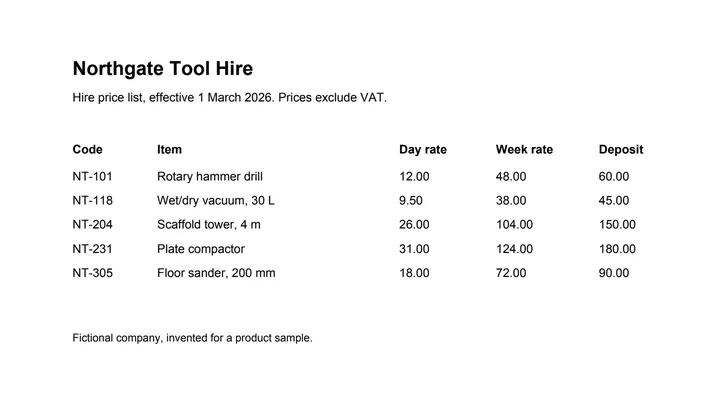
What copy-and-paste out of a PDF usually gives you, and what the tool gives you instead.
 (opens the sample PDF in a new tab)
Copied out, the columns run together: “NT-101 Rotary hammer drill 12.00 48.00 60.00 NT-118…”
| Code | Item | Day rate | Week rate | Deposit |
|---|---|---|---|---|
| NT-101 | Rotary hammer drill | 12.00 | 48.00 | 60.00 |
| NT-118 | Wet/dry vacuum, 30 L | 9.50 | 38.00 | 45.00 |
| NT-204 | Scaffold tower, 4 m | 26.00 | 104.00 | 150.00 |
What this tool does
This tool finds the tables in a PDF and gives them back as a spreadsheet. It reads the text and the positions already stored inside the file, works out where the row and column boundaries are, and writes each cell into the matching cell of an XLSX or CSV. It does not retype anything and it does not change the numbers: a value that was printed as 9.50 comes out as 9.50. Where a table runs over a page break and the columns line up, the parts are joined into one table. Cells the parser is unsure about are marked so you can check them instead of hunting for them.
The values in this file were read from your document by AI, and they can be wrong — check them against the original before you rely on them. Your document itself is not altered.
Is there a free PDF to Excel converter?
There are free ways, and for one simple table they may be all you need. Copy and paste costs nothing, but a PDF table's columns usually run together when you paste them. Excel for Microsoft 365 on Windows can import a table itself, under Data > Get Data > From File > From PDF. Free online converters exist too, though reading a scan is often limited or kept for a paid plan.
This page costs 1 credit a page, and new accounts get 20 credits. The price for your file is shown before anything is spent, and a PDF with no table in it is not charged. For that you get every table on its own sheet, a table that runs over several pages joined where the columns line up, and the cells the tool is unsure about marked, so you can correct them on the page before you download.
| Copy and paste | Excel's own PDF import | This page | |
|---|---|---|---|
| Cost | Free | Included with Excel | 1 credit a page; new accounts get 20 credits |
| Where it works | Any PDF viewer | Excel for Microsoft 365 on Windows | Any browser, with a free account |
| What you get | Text you split into columns yourself | The tables you pick, loaded into sheets | Every table on its own sheet, or as CSV, TSV or JSON |
| A table over several pages | Copied a page at a time | Similar tables on following pages joined by default | Joined where the columns line up |
Can I get all the pages of a PDF into one Excel sheet?
Yes, when the pages hold one table. Where a table runs over page breaks and the columns line up, the parts are joined into a single table on one sheet, and the header row repeated at the top of each page is written once.
Separate tables stay apart, each on its own sheet, because one sheet holding tables with different columns cannot be sorted or totalled cleanly. A row whose text is split by a page break is left as two rows rather than joined by guess.
A PDF can run to 50 pages until your account has bought credits, and to 300 after that.
Will the Excel file keep the PDF's formatting?
It keeps the table and the way its numbers read, not the look of the page. Numbers become real numbers shown the way the PDF printed them, so 1,24,500.00 keeps its Indian commas and a column of amounts adds up in Excel.
- Rows, columns and merged cells come across as they were laid out.
- An account number with a leading zero, or an ID longer than the 15 digits Excel holds, is kept as text so that Excel cannot change it.
- Fonts, colours, borders and pictures are not copied, and text outside the tables is left out.
- A cell the tool is unsure about is highlighted and carries a note. It stays as the exact text that was read until you correct it, so a column total leaves it out until then.
What happens to your file
Deleted from our servers after 2 hours. We do not train AI on your files, and the terms of our AI providers do not allow them to; they may keep request logs for up to 55 days, longer for a request they flag for abuse.
Uploads and outputs are deleted after 2 hours, whether or not you download them. Provider request logs are kept for at most 55 days. Details on the privacy page.
Questions
Can it convert a scanned PDF to Excel?
Not on this page: it reads PDFs that already have text in them, and a scan is only a picture of a page, so it has to be read with OCR first. The scanned invoice and scanned bank statement tools do that, and screenshot to table reads a table from a screenshot or a phone photo. To check your file, try selecting a line of text in your PDF viewer: if nothing highlights, it is a scan.
Can I convert a password-protected PDF to Excel?
Not while it is locked: a PDF that asks for a password when you open it is turned away at upload. Take the password off first with the unlock PDF tool, which works in your browser with the password you already have, such as the one your bank gave you, then upload the unlocked copy. A PDF that opens without a password but blocks printing or copying is read as it is.
Is it safe to upload a bank statement or other private PDF?
Your file is deleted from our servers after two hours, whether or not you download the result, and it is not used to train anything. While a job runs, parts of the file may be sent to the AI providers we use; they do not train on it and keep request logs for at most 55 days, longer only for a request they flag for abuse. Bank statements and payslips are allowed here, because extraction only reads a document and never changes it. If that is not acceptable for a particular document, do not upload it.
How accurate is it?
We have not published an accuracy figure, and we will not quote one we have not measured. Instead, every cell the tool is unsure about is marked, on the page and in the Excel file, and you can correct any cell on the page before you download; the file is built from your corrections. A table with ruling lines between its cells is the easiest case. One whose columns are separated only by space is harder, and more of its cells may be marked.
Can I get CSV instead of Excel, or paste the table into Google Sheets?
Yes. The download menu offers the same tables as Excel (.xlsx), CSV, TSV or JSON, and Copy for Sheets puts the table you are looking at on your clipboard, ready to paste into Google Sheets or Excel. A CSV file holds one table, so a PDF with several tables downloads as a zip of CSV files, one per table.
Related tools
- Convert a PDF table to CSVUpload a PDF and get its table back as a CSV file, one row per line, ready for a spreadsheet, a database or a script. Your file is deleted after two hours.
- Convert a scanned invoice to ExcelFor invoices that are a scan or a photo. The page is read with OCR and the line items come back as a spreadsheet. Your file is deleted after two hours.
- Convert a scanned bank statement to ExcelFor statements that are a scan, a photocopy or a photo of a passbook page. The transactions come back as a spreadsheet. Your file is deleted after two hours.
- Turn a screenshot of a table into ExcelUpload a screenshot or a photo of a table and get the rows and columns back as a spreadsheet you can sort and sum. Your file is deleted after two hours.
- Unlock a PDF — remove a password you know, or its restrictionsTake the password off a PDF you can open — a bank statement, an e-Aadhaar — or lift its print and copy restrictions. It happens on your device: nothing is uploaded, and nothing is guessed.
- Edit the text in a PDFSay what should change — a date, a name, a price — and get the same PDF back with those words rewritten in place, matching the font. Removed from our servers after 2 hours.
Extract tables from a PDF
- Convert a PDF table to JSON
- Convert an invoice PDF to Excel
- Convert a price list PDF to Excel
- Convert a mark sheet PDF to Excel
- Convert an HTML table to Excel
Tables & text out of a document
On ExploreMyData, our sister site
- Append CSV and Excel files into one table on ExploreMyDataTables from several PDFs with the same columns? Stack them into one, in your browser.
- Pivot table from a CSV on ExploreMyDataDownload the table as CSV, then count, sum or average it by any column, in your browser.