Convert an invoice PDF to Excel
Free account · 20 free credits. Sign up to run it.
Drop your PDF here
or choose it from your device
PDF · up to 1 file per job
or paste it here (Ctrl+V)
Before and after
What copy-and-paste out of an invoice gives you, and what the tool gives you instead.
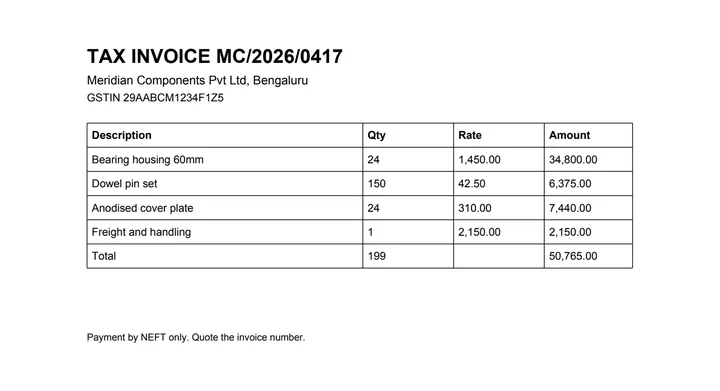 (opens the sample PDF in a new tab)
Copied out, the line items run together: “Bearing housing 60mm 24 1,450.00 34,800.00 Dowel pin set 150…”
| Description | Qty | Rate | Amount |
|---|---|---|---|
| Bearing housing 60mm | 24 | 1,450.00 | 34,800.00 |
| Dowel pin set | 150 | 42.50 | 6,375.00 |
| Anodised cover plate | 24 | 310.00 | 7,440.00 |
What this tool does
This tool pulls the line-item table out of an invoice PDF and writes it into a spreadsheet. It reads the text and the positions already stored inside the document, finds where the description, quantity, rate and amount columns are, and puts each value in its own cell. Invoices are usually ruled, and where a cell is closed on all four sides the grid is read straight off those lines without any guessing. Totals, tax lines and freight rows are copied as rows like any other; they are not treated specially and they are not recalculated, so the spreadsheet says what the invoice says. Where an invoice runs to a second page and the columns line up, the two parts are joined into one table. Cells the parser was unsure about are marked rather than silently accepted.
The values in this file were read from your document by AI, and they can be wrong — check them against the original before you rely on them. Your document itself is not altered.
What happens to your file
Deleted from our servers after 2 hours. We do not train AI on your files, and the terms of our AI providers do not allow them to; they may keep request logs for up to 55 days, longer for a request they flag for abuse.
Uploads and outputs are deleted after 2 hours, whether or not you download them. Provider request logs are kept for at most 55 days. Details on the privacy page.
Questions
What happens to the file I upload?
It is deleted from our servers after two hours, whether or not you download the result, and it is not used to train anything. While a job runs, parts of the file may be sent to the AI providers we use; they do not train on it and keep request logs for at most 55 days, longer only for a request they flag for abuse.
Does it check that the line items add up to the total?
It tells you when a column that looks like it should total does not, and then leaves the figures alone. It will not quietly adjust a number to make an invoice balance. If the extraction is wrong you want to see that it is wrong, not have it papered over.
Can it handle several invoices at once?
One file per run on this page. Batch runs are a paid feature and are not open yet; when they are, they will be on their own page with their own price rather than appearing here without warning.
How accurate is it?
We have not published a number yet, and we are not going to quote one we have not measured. The tool marks the cells it is unsure about, which is the part that actually saves you time.
My invoices are scans from a supplier. Will this work?
Not from this page. If nothing highlights when you try to select text in your PDF viewer, the invoice is an image and needs OCR first — use the scanned invoice tool, listed under Related tools below. A digital invoice emailed by an accounting package will work here.
Related tools
- Convert a scanned invoice to ExcelFor invoices that are a scan or a photo. The page is read with OCR and the line items come back as a spreadsheet. Your file is deleted after two hours.
- Convert an invoice PDF to CSVTurn the line items on an invoice PDF into a CSV file you can import into accounting or inventory software. Your file is deleted after two hours.
- Convert an invoice PDF to JSONGet an invoice's line items as structured JSON, with a confidence score on every cell, for feeding into your own software. Your file is deleted after two hours.
- Convert a PDF table to ExcelExtract the tables from a PDF into Excel, every value in its own cell, merged cells kept and doubtful cells flagged. Your file is deleted after two hours.
Extract tables from a PDF
- Convert an invoice PDF to SQL
- Convert a PDF table to CSV
- Convert a PDF table to JSON
- Convert a price list PDF to Excel
- Convert a mark sheet PDF to Excel
- Convert an HTML table to Excel
Tables & text out of a document
Guides and free sample files
- Sample invoice PDF · free sample file