Convert an invoice PDF to CSV
Free account · 20 free credits. Sign up to run it.
Drop your PDF here
or choose it from your device
PDF · up to 1 file per job
or paste it here (Ctrl+V)
Before and after
An invoice is laid out for a human to read. CSV is laid out for software to import.
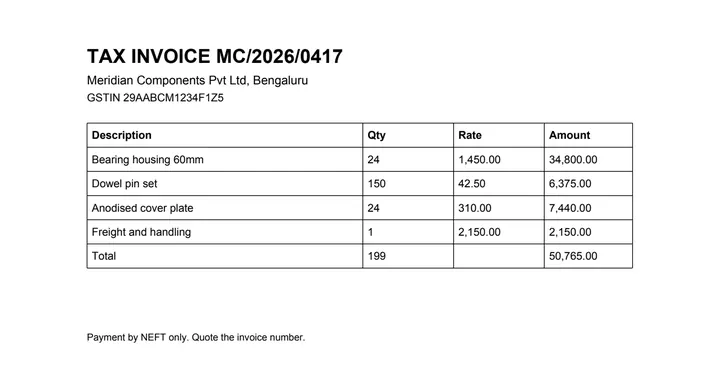 (opens the sample PDF in a new tab)
Copied out, the line items run together: “Bearing housing 60mm 24 1,450.00 34,800.00 Dowel pin set 150…”
Description,Qty,Rate,Amount
Bearing housing 60mm,24,"1,450.00","34,800.00"
Dowel pin set,150,42.50,"6,375.00"
Freight and handling,1,"2,150.00","2,150.00"
What this tool does
This tool reads the line-item table off an invoice PDF and writes it as a comma-separated file. The column boundaries are found from the text positions already inside the document rather than by retyping anything, and each line item becomes one row of the CSV. Fields that contain a comma — a description like "Bearing housing, 60mm" — are quoted, so the file opens correctly in whatever you import it into instead of splitting into the wrong number of columns. Quantities and amounts are written exactly as printed, with their separators, and no value is rounded or converted to a different number format. If the invoice continues onto a second page with the same columns, the parts are joined first so the CSV has one header line rather than two.
The values in this file were read from your document by AI, and they can be wrong — check them against the original before you rely on them. Your document itself is not altered.
What happens to your file
Deleted from our servers after 2 hours. We do not train AI on your files, and the terms of our AI providers do not allow them to; they may keep request logs for up to 55 days, longer for a request they flag for abuse.
Uploads and outputs are deleted after 2 hours, whether or not you download them. Provider request logs are kept for at most 55 days. Details on the privacy page.
Questions
What happens to the file I upload?
It is deleted from our servers after two hours, whether or not you download the result, and it is not used to train anything. While a job runs, parts of the file may be sent to the AI providers we use; they do not train on it and keep request logs for at most 55 days, longer only for a request they flag for abuse.
What happens to a description that contains a comma?
It is quoted, which is what the CSV format is for. The file is written so that a description like "Bearing housing, 60mm" stays in one field rather than becoming two columns and pushing every amount one place to the right.
Will the amounts keep their thousands separators?
Yes. They are copied exactly as printed, which means a field like "1,450.00" is written quoted. If your importer wants a bare number, strip the separators on your side, where you know which character is the decimal point on that invoice. We are not going to guess.
How accurate is it?
We have not published a number yet, and we are not going to quote one we have not measured. The tool marks the cells it is unsure about.
Should I use CSV or Excel?
CSV if software is going to read it: there is no formatting to misinterpret and every accounting package takes it. Excel if a person is going to read it, because the XLSX output keeps one sheet per table and marks the doubtful cells visibly.
Related tools
- Convert an invoice PDF to ExcelUpload an invoice PDF and get the line items back as a spreadsheet, with the quantities and amounts exactly as printed. Your file is deleted after two hours.
- Convert an invoice PDF to JSONGet an invoice's line items as structured JSON, with a confidence score on every cell, for feeding into your own software. Your file is deleted after two hours.
- Convert a PDF table to ExcelExtract the tables from a PDF into Excel, every value in its own cell, merged cells kept and doubtful cells flagged. Your file is deleted after two hours.
- Convert a price list PDF to CSVTurn a supplier price list PDF into a CSV you can import as a product catalogue. Your file is deleted after two hours.
Extract tables from a PDF
- Convert an invoice PDF to SQL
- Convert a PDF table to CSV
- Convert a PDF table to JSON
- Convert a price list PDF to Excel
- Convert a mark sheet PDF to Excel
- Convert an HTML table to Excel
- Convert a scanned invoice to Excel
Tables & text out of a document
Guides and free sample files
- Sample invoice PDF · free sample file