Convert a PDF table to JSON
Upload a PDF and get its tables back as JSON: header and body rows exactly as printed, merged cells, and each cell's confidence, ready for code. It works on PDFs whose text you can select.
Free account · 20 free credits. Sign up to run it.
Drop your PDF here
or choose it from your device
PDF · up to 1 file per job
or paste it here (Ctrl+V)
How to convert a PDF table to JSON
- Sign in or create a free account, then choose the PDF. Use a PDF whose text you can select, not a scan.
- Press Extract as JSON. The price for your file, 1 credit a page, is shown before anything is spent; press the button again to run it.
- Correct any marked cell on the page, then download JSON. Excel, CSV and TSV are in the same menu.
Before and after
Text a PDF viewer draws, turned into data a program can read.
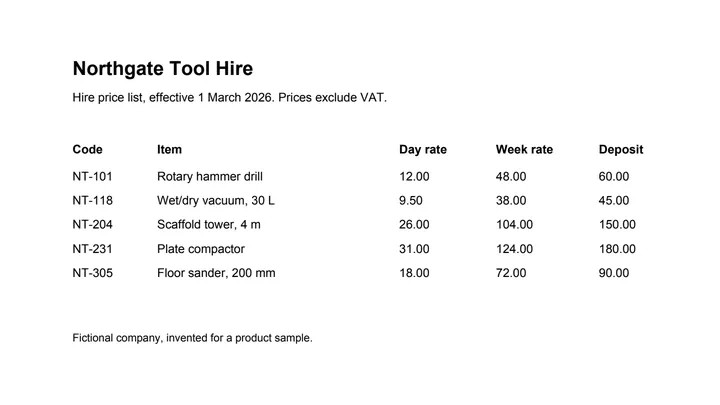 (opens the sample PDF in a new tab)
Copied out, a row is one line of loose words: “NT-101 Rotary hammer drill 12.00 48.00 60.00”
{"tables": [{"page": 1,
  "header": [["Code", "Item", "Day", "Week", "Deposit"]],
  "rows": [["NT-101", "Rotary hammer drill", "12.00", "48.00", "60.00"], ...],
  "merges": [], "cells": [...]}]}
What this tool does
This tool reads the tables out of a PDF and returns them as JSON — a list of tables, each with its header rows, its body rows, where a cell spanned more than one column or row, and how sure the reader was of every cell. The text and positions are read from the file itself; nothing is retyped or rounded. JSON is the format to pick when a program will read the result: unlike CSV it can say that a cell was merged, and unlike a spreadsheet it can say so in a way code can use.
The values in this file were read from your document by AI, and they can be wrong — check them against the original before you rely on them. Your document itself is not altered.
What the JSON looks like
One object with a "tables" list, one entry for each table found, in page order.
- "page": the page the table starts on.
- "header" and "rows": the header rows and the body rows, each a list of strings exactly as printed.
- "merges": every cell that spans more than one row or column, with its row, column and span.
- "cells": every cell again, with its row and column, its text, its type, its confidence from 0 to 1, a "low" flag on the cells worth a check, and "flags" naming any check it failed.
Tables with no lines between the columns
Our sample is a hire price list whose columns are separated only by space. Read on our own machines alone (recorded on 23 September 2026), its 5 rows and 5 columns came out as printed, but all 30 cells were marked low-confidence, because column edges that exist only as gaps are a guess. That is why the live tool also sends such a page to an AI vision model and reconciles the two readings, and why the confidence is in the JSON for your code to act on.
What happens to your file
Deleted from our servers after 2 hours. We do not train AI on your files, and the terms of our AI providers do not allow them to; they may keep request logs for up to 55 days, longer for a request they flag for abuse.
Uploads and outputs are deleted after 2 hours, whether or not you download them. Provider request logs are kept for at most 55 days. Details on the privacy page.
Questions
What does the JSON look like?
One object per table with its page, its header rows and body rows as arrays of strings, the span of any merged cell, and every cell again with its type and the reader's confidence. Values are strings exactly as printed — 9.50 stays "9.50" — so nothing is lost to a number parser before your code sees it.
What happens to the file I upload?
It is deleted from our servers after two hours, whether or not you download the result, and it is not used to train anything. A PDF with a text layer is read on our own machines, and a table whose ruling lines already fix every cell never leaves them; any other table is sent to an AI provider to work out its rows and columns. The provider does not train on it and keeps request logs for at most 55 days, longer only for a request it flags for abuse.
Is there an API?
Not a public one yet. This page runs the same pipeline an API would, and the JSON it returns is the shape an API would return, so code written against a download today will not need to change.
Does it work on a scanned PDF?
Not this page. If you cannot select the text in your PDF, it is a picture of a page, and it has to be read with OCR first: the scanned invoice and scanned bank statement tools do that for those documents, and screenshot to table reads a table from a picture.
What does it cost?
One credit per page, shown before anything runs. Running it needs an account: signing up is free, and new accounts get 20 credits, which is twenty pages.
Related tools
- Convert a PDF table to ExcelExtract the tables from a PDF into Excel, every value in its own cell, merged cells kept and doubtful cells flagged. Your file is deleted after two hours.
- Convert an invoice PDF to JSONGet an invoice's line items as structured JSON, with a confidence score on every cell, for feeding into your own software. Your file is deleted after two hours.
- Convert an HTML table to JSONUpload a saved web page and get its tables as structured JSON, with header rows and merged cells described. Your file is deleted after two hours.
Extract tables from a PDF
- Convert a PDF table to CSV
- Convert an invoice PDF to Excel
- Convert a price list PDF to Excel
- Convert a mark sheet PDF to Excel
- Convert an HTML table to Excel
- Convert a scanned invoice to Excel