Convert a PDF table to CSV
Upload a PDF and get its table back as a CSV file: one row per line, commas between cells, UTF-8, ready for a database import, a script or a spreadsheet. For PDFs whose text you can select.
Free account · 20 free credits. Sign up to run it.
Drop your PDF here
or choose it from your device
PDF · up to 1 file per job
or paste it here (Ctrl+V)
How to convert a PDF table to CSV
- Sign in or create a free account, then choose the PDF. Use a PDF whose text you can select, not a scan.
- Press Extract as CSV. The price for your file, 1 credit a page, is shown before anything is spent; press the button again to run it.
- Correct any marked cell on the page, then download CSV. Excel, JSON and TSV are in the same menu.
Before and after
What copy-and-paste out of a PDF usually gives you, and the CSV this tool writes instead.
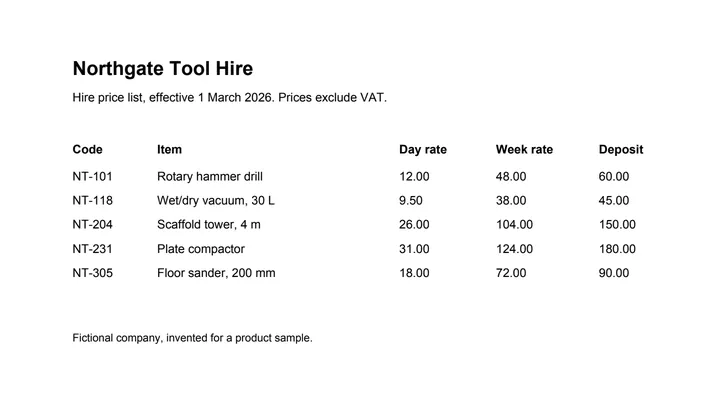 (opens the sample PDF in a new tab)
Copied out, the columns run together: “NT-101 Rotary hammer drill 12.00 48.00 60.00 NT-118…”
Code,Item,Day,Week,Deposit
NT-101,Rotary hammer drill,12.00,48.00,60.00
NT-118,"Wet/dry vacuum, 30 L",9.50,38.00,45.00
What this tool does
This tool finds the table in a PDF and writes it out as CSV — plain text, one row per line, the cells separated by commas. It reads the text and positions already stored in the file, works out where the rows and columns are, and puts each value in its own field without retyping or rounding anything. CSV is the format to pick when the table is going somewhere other than a person's eyes: a database import, a script, another tool. CSV has no way to say that a cell was merged; if that matters to you, the JSON page keeps the spans.
The values in this file were read from your document by AI, and they can be wrong — check them against the original before you rely on them. Your document itself is not altered.
What the CSV file looks like
Plain UTF-8 text: the table's header rows first, a comma between cells, and a CRLF line ending after each row, as the CSV standard (RFC 4180) has it. A value with a comma in it is quoted, so "Wet/dry vacuum, 30 L" stays one field. Our five-row sample price list came to a 0.3 kB file. Excel can misread letters outside English when it opens a UTF-8 CSV with a double-click; import it with Data > From Text/CSV, or take the Excel download instead.
CSV, JSON or Excel?
The same table, three ways. CSV is the plainest and the one most programs import; it cannot say which cells were merged or doubtful.
| CSV | JSON | Excel (.xlsx) | |
|---|---|---|---|
| Several tables | A .zip with one CSV per table | One file, a list of tables | One sheet per table |
| Merged cells | Not kept | Kept, as "merges" | Kept, merged |
| Cells worth a check | Not marked | A confidence and a "low" flag on each cell | Highlighted, with a note |
| Best for | Imports and scripts | Code that checks each cell | People |
What happens to your file
Deleted from our servers after 2 hours. We do not train AI on your files, and the terms of our AI providers do not allow them to; they may keep request logs for up to 55 days, longer for a request they flag for abuse.
Uploads and outputs are deleted after 2 hours, whether or not you download them. Provider request logs are kept for at most 55 days. Details on the privacy page.
Questions
Which delimiter and encoding does the CSV use?
Commas and UTF-8, with the table's header rows first. A value that contains a comma is quoted, so "Wet/dry vacuum, 30 L" stays one field.
What happens to the file I upload?
It is deleted from our servers after two hours, whether or not you download the result, and it is not used to train anything. A PDF with a text layer is read on our own machines, and a table whose ruling lines already fix every cell never leaves them; any other table is sent to an AI provider to work out its rows and columns. The provider does not train on it and keeps request logs for at most 55 days, longer only for a request it flags for abuse.
My PDF has several tables. What do I get?
A zip with one CSV per table, because a CSV file can only hold one. If a table runs over a page break and its columns line up, the parts are joined into a single table first.
Does it work on a scanned PDF?
Not this page. If you cannot select the text in your PDF, it is a picture of a page, and it has to be read with OCR first: the scanned invoice and scanned bank statement tools do that for those documents, and screenshot to table reads a table from a picture.
What does it cost?
One credit per page, shown before anything runs. Running it needs an account: signing up is free, and new accounts get 20 credits, which is twenty pages.
Related tools
- Convert a PDF table to ExcelExtract the tables from a PDF into Excel, every value in its own cell, merged cells kept and doubtful cells flagged. Your file is deleted after two hours.
- Convert an invoice PDF to CSVTurn the line items on an invoice PDF into a CSV file you can import into accounting or inventory software. Your file is deleted after two hours.
Extract tables from a PDF
- Convert a PDF table to JSON
- Convert an invoice PDF to Excel
- Convert a price list PDF to Excel
- Convert a mark sheet PDF to Excel
- Convert an HTML table to Excel
- Convert a scanned invoice to Excel