Convert a price list PDF to Excel
Upload a supplier's price list or rate card PDF and get the catalogue back as an Excel sheet: one row per item, every code, pack size and price in its own cell, copied exactly as printed.
Free account · 20 free credits. Sign up to run it.
Drop your PDF here
or choose it from your device
PDF · up to 1 file per job
or paste it here (Ctrl+V)
How to convert a price list PDF to Excel
- Sign in or create a free account, then choose the price list. Use a PDF whose text you can select, not a scan.
- Press Extract the price list. The price for your file, 1 credit a page, is shown before anything is spent; press the button again to run it.
- Check the marked cells and correct any on the page. Then download Excel (.xlsx), CSV, TSV or JSON, or press Copy for Sheets and paste the list into a spreadsheet.
Before and after
A price list you cannot sort is a price list you have to read line by line.
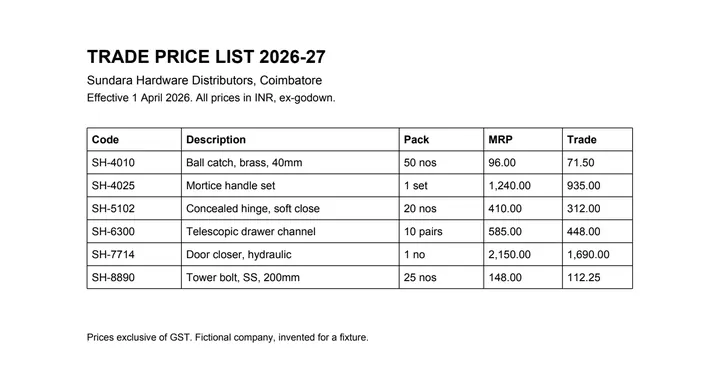 (opens the sample PDF in a new tab)
Copied out, the rows run together: “SH-4010 Ball catch, brass, 40mm 50 nos 96.00 71.50 SH-4025…”
| Code | Description | Pack | MRP | Trade |
|---|---|---|---|---|
| SH-4010 | Ball catch, brass, 40mm | 50 nos | 96.00 | 71.50 |
| SH-4025 | Mortice handle set | 1 set | 1,240.00 | 935.00 |
What this tool does
This tool takes a price list or rate card that arrived as a PDF and gives the catalogue back as a spreadsheet, one row per item. It reads the text and positions already inside the file to work out where the code, description, pack size and price columns sit, and writes each value into its own cell so you can sort by price, compare two suppliers, or paste the lot into your own pricing sheet. Prices are copied exactly as printed and no margin, tax or rounding is applied. Some price lists are ruled and some separate their columns with nothing but whitespace; the second kind is harder, because a column boundary that exists only as a gap can be misread, and on those pages the cells the parser was least sure about are marked. Long catalogues that run over many pages are joined into one table where the columns line up.
The values in this file were read from your document by AI, and they can be wrong — check them against the original before you rely on them. Your document itself is not altered.
What it made of our sample price list
Our sample is a one-page trade price list from an invented hardware distributor: six items in a ruled grid. Recorded on 23 September 2026, the tool read it as 6 rows and 5 columns (code, description, pack, MRP and trade price) from the ruling lines alone, on our own machines with no AI provider called. It marked no cell as doubtful and wrote a 5.1 kB Excel file.
- Every price was read exactly as printed, commas and decimals included, from 71.50 to 2,150.00.
- Pack sizes such as 50 nos, 1 set and 10 pairs stayed text, in their own column, apart from the prices.
- The MRP and trade columns stayed side by side, so the margin on each item is one subtraction away.
Can I compare two suppliers' price lists?
Yes, once each is a spreadsheet. Convert both lists, put the sheets in one workbook and look each item up by its code with XLOOKUP or VLOOKUP, in Excel or Google Sheets, to line up the same product from both suppliers. The tool does not match items between suppliers for you, and it never applies a discount, a margin or tax: it copies the numbers that are printed.
Long catalogues, and lists with no lines between columns
A catalogue that runs over many pages comes back as one table where the columns line up across the page breaks, with the repeated header written once. A PDF can run to 50 pages until your account has bought credits, and to 300 after that.
A list that separates its columns with nothing but space is harder than a ruled one, because the column edges have to be inferred. Such a page is also read by an AI vision model and the two readings are reconciled, and the cells it is least sure of are marked. Check the first rows of such a list before you trust the rest.
What happens to your file
Deleted from our servers after 2 hours. We do not train AI on your files, and the terms of our AI providers do not allow them to; they may keep request logs for up to 55 days, longer for a request they flag for abuse.
Uploads and outputs are deleted after 2 hours, whether or not you download them. Provider request logs are kept for at most 55 days. Details on the privacy page.
Questions
What happens to the file I upload?
It is deleted from our servers after two hours, whether or not you download the result, and it is not used to train anything. While a job runs, parts of the file may be sent to the AI providers we use; they do not train on it and keep request logs for at most 55 days, longer only for a request they flag for abuse.
My price list has no lines between the columns. Does that matter?
It makes it harder. When a column exists only as a gap in the whitespace, the boundary has to be inferred, and a gap read in the wrong place puts a whole column of prices one cell out. Those pages get more scrutiny and the doubtful cells are marked. It is worth a glance at the first few rows before you trust the whole file.
Will it apply my discount or add tax?
No. It copies the numbers that are printed and nothing else. A converter that quietly applied a margin would be a pricing tool, and a pricing error you did not make yourself is the worst kind to find.
How accurate is it?
We have not published a number yet, and we are not going to quote one we have not measured. The tool marks the cells it is unsure about.
The catalogue is 60 pages. Will it come back as one sheet?
Where the columns line up across the page breaks, yes — the parts are joined into one table and the repeated header is written once. Where a page genuinely starts a different table, with different columns, it stays a separate table on its own sheet.
Related tools
- Convert a price list PDF to CSVTurn a supplier price list PDF into a CSV you can import as a product catalogue. Your file is deleted after two hours.
- Convert a PDF table to ExcelExtract the tables from a PDF into Excel, every value in its own cell, merged cells kept and doubtful cells flagged. Your file is deleted after two hours.
- Convert an HTML table to ExcelUpload a saved web page and get the table back as a spreadsheet, merged cells and all. Your file is deleted after two hours.
Extract tables from a PDF
- Convert a PDF table to CSV
- Convert a PDF table to JSON
- Convert an invoice PDF to Excel
- Convert a mark sheet PDF to Excel
- Convert a scanned invoice to Excel