Convert an invoice PDF to JSON
Upload an invoice PDF and get its line items as JSON for your own code: the rows exactly as printed, and a confidence score and the failed checks on every cell. For PDFs whose text you can select.
Free account · 20 free credits. Sign up to run it.
Drop your PDF here
or choose it from your device
PDF · up to 1 file per job
or paste it here (Ctrl+V)
How to convert an invoice PDF to JSON
- Sign in or create a free account, then choose the invoice. Use a PDF whose text you can select, not a scan.
- Press Extract as JSON. The price for your file, 1 credit a page, is shown before anything is spent; press the button again to run it.
- Correct any marked cell on the page, then download JSON. The same table is in the menu as Excel, CSV or TSV if a person needs it too.
Before and after
A PDF says where the ink goes. JSON says what the line items are.
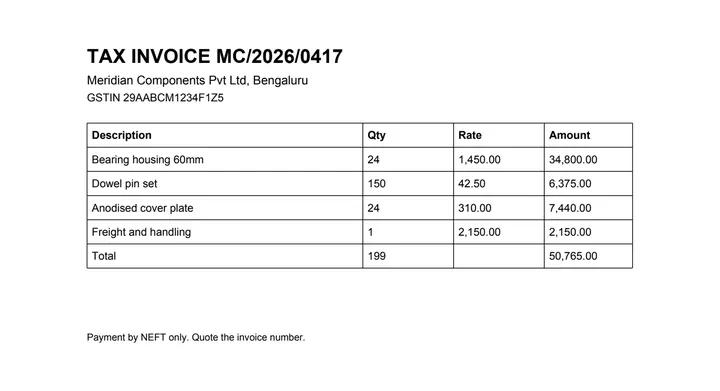 (opens the sample PDF in a new tab)
Inside, it is only text placed on the page: “BT /F1 9 Tf 76 636 Td (Bearing housing 60mm) Tj ET…”
{"tables": [{"page": 1,
  "header": [["Description", "Qty", "Rate", "Amount"]],
  "rows": [["Bearing housing 60mm", "24",
            "1,450.00", "34,800.00"], ...]}]}
What this tool does
This tool reads the line-item table out of an invoice PDF and returns it as JSON instead of as a spreadsheet. The grid is found from the text and positions already in the document; on a ruled invoice that is read straight off the ruling lines without sending anything to a model. What comes back is an array of tables, each with its columns and its rows, and — unlike a spreadsheet — with the things the pipeline knew that a cell in Excel cannot hold: which rows were headers, which cells the reader was least sure about, and which checks a cell failed. If you are posting invoices into a ledger automatically, that per-cell confidence is the difference between a queue of exceptions a person can check and a set of silently wrong entries nobody notices until the quarter closes.
The values in this file were read from your document by AI, and they can be wrong — check them against the original before you rely on them. Your document itself is not altered.
What it made of our sample invoice
Our sample is a one-page tax invoice from an invented company: four lines and a total row in a ruled table. Recorded on 23 September 2026, the tool read it as 5 rows and 4 columns (description, quantity, rate and amount) from the ruling lines alone, on our own machines with no AI provider called, and wrote a 5.9 kB JSON file with no cell marked low.
- Each line's amount is its quantity times its rate (24 × 1,450.00 = 34,800.00), and the total row's 199 and 50,765.00 are the sums of the lines. The tool checks both; a sum that failed would be flagged.
- Values stay strings, exactly as printed, so "1,450.00" reaches your code with its comma.
Which fields should my code read?
For line items, read each table's "rows": one list per line, in the order of the "header" columns. Before you post a line, look it up in "cells": a cell whose "low" is true, or whose "flags" include a "totals:" check, is the one a person should see first. The total row is a body row like any other, so leave it out before you add the lines up, or it is counted twice.
What happens to your file
Deleted from our servers after 2 hours. We do not train AI on your files, and the terms of our AI providers do not allow them to; they may keep request logs for up to 55 days, longer for a request they flag for abuse.
Uploads and outputs are deleted after 2 hours, whether or not you download them. Provider request logs are kept for at most 55 days. Details on the privacy page.
Questions
What happens to the file I upload?
It is deleted from our servers after two hours, whether or not you download the result, and it is not used to train anything. While a job runs, parts of the file may be sent to the AI providers we use; they do not train on it and keep request logs for at most 55 days, longer only for a request they flag for abuse.
Does the JSON follow a named invoice schema like UBL or Peppol?
No. What you get is the table as it was printed — columns and rows — not a mapping into an e-invoicing standard. Deciding that a column headed "Rate" is the unit price excluding tax is a judgement about your supplier's stationery, and getting it wrong inside a standard schema is worse than not claiming the standard at all.
Is there an API?
Not open yet. The engine behind this page is already a job queue with a REST interface, so opening it is a decision rather than a build, but we are not going to publish an endpoint before we are ready to keep it stable.
How accurate is it?
We have not published a number yet, and we are not going to quote one we have not measured. Use the per-cell confidence in the JSON — that number is real and it is per file.
Are numbers returned as numbers?
No, as strings, exactly as printed. Turning "1,450.00" into a number means deciding what the comma means, and that differs between suppliers and locales on invoices that look identical. You know your suppliers; we do not.
Related tools
- Convert an invoice PDF to ExcelUpload an invoice PDF and get the line items back as a spreadsheet, with the quantities and amounts exactly as printed. Your file is deleted after two hours.
- Convert an invoice PDF to CSVTurn the line items on an invoice PDF into a CSV file you can import into accounting or inventory software. Your file is deleted after two hours.
- Convert a bank statement PDF to JSONGet the transactions out of a statement PDF as structured JSON, with a confidence score on every cell. Your file is deleted after two hours.
Extract tables from a PDF
- Convert an invoice PDF to SQL
- Convert a PDF table to Excel
- Convert a PDF table to CSV
- Convert a PDF table to JSON
- Convert a price list PDF to Excel
- Convert a mark sheet PDF to Excel
- Convert an HTML table to Excel
- Convert a scanned invoice to Excel
Tables & text out of a document
Guides and free sample files
- Sample invoice PDF · free sample file