Convert an invoice PDF to SQL
Upload an invoice PDF and get its line items as SQL: a CREATE TABLE with column types read from the data, and INSERT statements with every value quoted, for PostgreSQL or SQLite.
Free account · 20 free credits. Sign up to run it.
Drop your PDF here
or choose it from your device
PDF · up to 1 file per job
or paste it here (Ctrl+V)
How to turn an invoice PDF into SQL
- Sign in or create a free account, then choose the invoice. Use a PDF whose text you can select, not a scan.
- Press Extract as SQL. The price for your file, 1 credit a page, is shown before anything is spent; press the button again to run it.
- Correct any marked cell on the page, then download SQL (PostgreSQL) or SQL (SQLite). Read the CREATE TABLE before you run the INSERTs.
Before and after
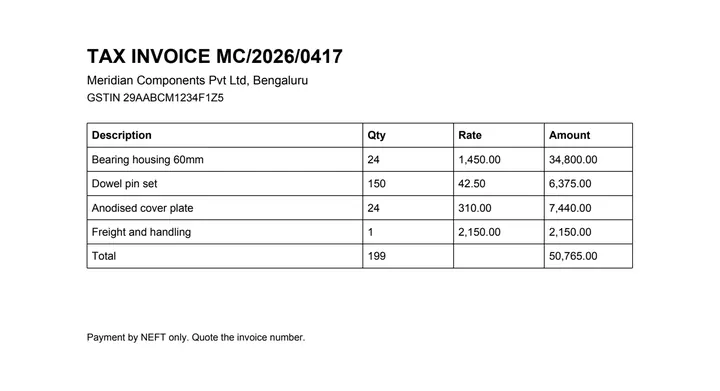
The grid on the invoice, and the statements that put it in a database.
CREATE TABLE "t0" (
    "description" text, "qty" bigint,
    "rate" numeric, "amount" numeric);

INSERT INTO "t0" ("description","qty","rate","amount") VALUES
    ('Bearing housing 60mm', 24, 1450.00, 34800.00),
    ('Dowel pin set', 150, 42.50, 6375.00);
What this tool does
This tool reads the line-item table off an invoice PDF and writes it as SQL: one CREATE TABLE for the grid and INSERT statements for the rows, ready to run against Postgres or SQLite. Column names come from the header row, cleaned into identifiers. Unlike the spreadsheet and CSV outputs, this one does look at your data: a column becomes a number or a date only when every non-empty cell in it parses that way, and a single unreadable cell makes the whole column text, so a type is never guessed on a majority vote. Empty cells, and the dashes a document writes for "nothing here", become NULL rather than empty strings. Every identifier and every value is quoted, so no cell of your document can be read as SQL — which matters, because a description field is exactly where an apostrophe lives.
The values in this file were read from your document by AI, and they can be wrong — check them against the original before you rely on them. Your document itself is not altered.
What it made of our sample invoice
Recorded on 23 September 2026 from our one-page sample invoice, with no AI provider called: a 1.0 kB PostgreSQL file holding one CREATE TABLE and the invoice's five rows as INSERTs.
- The description column became text, qty bigint, and rate and amount numeric, because every cell in those columns parsed as a number.
- 1,450.00 was written as the number 1450.00, and the total row's empty rate as NULL, not an empty string.
- The table is called t0 and its columns take the header's words, cleaned into identifiers; rename them to fit your own schema.
What about the total row?
It comes through as a row like any other: the sample's last INSERT is ('Total', 199, NULL, 50765.00). If you are loading line items, delete that row, or filter it out with WHERE description <> 'Total', before you add the table up, or the total is counted twice.
What happens to your file
Deleted from our servers after 2 hours. We do not train AI on your files, and the terms of our AI providers do not allow them to; they may keep request logs for up to 55 days, longer for a request they flag for abuse.
Uploads and outputs are deleted after 2 hours, whether or not you download them. Provider request logs are kept for at most 55 days. Details on the privacy page.
Questions
What happens to the file I upload?
It is deleted from our servers after two hours, whether or not you download the result, and it is not used to train anything. While a job runs, parts of the file may be sent to the AI providers we use; they do not train on it and keep request logs for at most 55 days, longer only for a request they flag for abuse.
Can a value in my document break out and run as SQL?
That is the thing this exporter is built to prevent. Identifiers and literals are quoted, so an apostrophe in a description or a semicolon in a note is data and stays data. If a value cannot be quoted safely the export fails rather than emitting a statement we are not sure about.
Why does this change my numbers when the Excel version does not?
Because a database column has a type and a spreadsheet cell does not. To write "1,450.00" into a numeric column it has to become 1450.00. A column is only narrowed to a number or a date when every non-empty cell in it parses; one cell that does not makes the whole column text, so you never get a column that is right for most rows and silently wrong for the rest.
Which dialect do I get?
PostgreSQL by default, with SQLite available. The two differ in more than syntax — the Postgres output uses bigint rather than integer, because a document number is not an int4 — so pick the one you are actually going to run it against.
How accurate is it?
We have not published a number yet, and we are not going to quote one we have not measured. Read the CREATE TABLE before you run the INSERTs: the column types it chose tell you a lot about whether the extraction went well.
Related tools
- Convert an invoice PDF to JSONGet an invoice's line items as structured JSON, with a confidence score on every cell, for feeding into your own software. Your file is deleted after two hours.
- Convert an invoice PDF to ExcelUpload an invoice PDF and get the line items back as a spreadsheet, with the quantities and amounts exactly as printed. Your file is deleted after two hours.
- Convert a bank statement PDF to JSONGet the transactions out of a statement PDF as structured JSON, with a confidence score on every cell. Your file is deleted after two hours.
Extract tables from a PDF
- Convert an invoice PDF to CSV
- Convert a PDF table to Excel
- Convert a PDF table to CSV
- Convert a PDF table to JSON
- Convert a price list PDF to Excel
- Convert a mark sheet PDF to Excel
- Convert an HTML table to Excel
- Convert a scanned invoice to Excel
Tables & text out of a document
Guides and free sample files
- Sample invoice PDF · free sample file