Unlock a PDF — remove a password you know, or its restrictions
Remove a password you know from a PDF, or lift its print and copy restrictions, free in your browser. The file and the password stay on your device, and the page never guesses a password.
Drop a PDF here
PDF · one file, up to 50 MB
No file to hand?
or paste it here (Ctrl+V)
Nothing is uploaded: it all happens in this browser.
How to remove a password from a PDF
- Choose the PDF: one file of up to 50 MB and 300 pages. It is checked on your device, and the page says whether it needs a password to open or only has restrictions.
- If it needs a password, type the one you were given, for example by your bank or by UIDAI for e-Aadhaar. A PDF with only restrictions needs nothing typed.
- Download the unlocked copy: the same pages, exactly as they were, opening with no password and no print or copy limits.
Before and after
The same pages, without the lock.
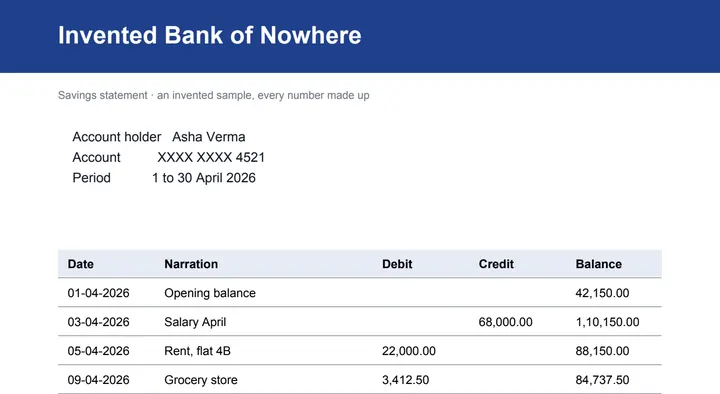 (opens the sample PDF in a new tab)
Page 1 of the invented statement, which asks for the password sample123
Opens without a password.
Same pages, same text, nothing added.
What this tool does
Choose a PDF of up to 50 MB and 300 pages. This page looks at it on your device first. If it needs a password to open, type the password — the one you were given, for example by your bank or by UIDAI for e-Aadhaar — and the file unlocks as soon as it is right; a wrong one gets "That password does not open this PDF." and nothing else. If it opens without a password but stops you printing, copying or changing it, those restrictions are removed with nothing to type. Either way you download the same pages, exactly as they were, without the lock. The page never guesses, tries lists or cracks a password: the only password it ever tries is the one you type. The work is done by qpdf, a free PDF tool, which downloads to your browser from this site when you choose the file; the file and the password stay on your device and are not saved. No mark is added to your file.
Two kinds of PDF lock
A PDF can be locked against opening, or open freely but locked against printing, copying or changes. This page removes either; only the first needs a password from you.
| Password to open | Restrictions only | |
|---|---|---|
| Can you read it without typing anything? | No | Yes |
| What it stops | Opening the file | Printing, copying text, or editing |
| Typical example | A bank statement, an e-Aadhaar PDF | A form or a report locked by its maker |
| What you type here | The password you were given | Nothing |
Our sample, unlocked
Our sample is an invented two-page statement locked with AES-256 and the password sample123: 3,460 bytes. Typed into this page, the password opened it, and the unlocked copy, 3,957 bytes, was ready about a second after the file was chosen, on a desktop computer. The pages are the same, and the copy opens in any reader with nothing to type.
What it will not do
It removes a lock you have the right to remove; it is not a way into a file you were not given the password for.
- It never guesses, tries word lists or cracks a password. The only password tried is the one you type.
- A lost password cannot be recovered here; ask whoever sent the file for it or for a new copy.
- The password is used in this tab only. It is not sent anywhere, saved or logged.
What happens to your file
Your file never leaves your device. This page opens it, changes it and saves the result in your browser; nothing is uploaded, so there is no copy on our servers to delete.
No AI provider sees it either. The page sends us one count that a run happened — no file, no name, no size. Details on the privacy page.
Questions
Can it open a PDF if I do not know the password?
No. This page never guesses, cracks or looks up a password: the only one it tries is the one you type. If you have lost it, ask whoever sent the file for it or for a new copy. A PDF that opens without a password but will not let you print or copy is different — those restrictions come off here with nothing to type.
What is the password of my e-Aadhaar PDF?
UIDAI sets it, and describes it in its e-Aadhaar FAQ: the first four letters of your name as printed on your Aadhaar, in capital letters, followed by your year of birth. For example, SURESH KUMAR born in 1990 has the password SURE1990, and RIA born in 1990 has RIA1990. Type it here the same way.
What is the password of my bank statement?
Each bank sets its own and says what it is in the email or the letter the statement came with, or on its website — often a mix of your name, your date of birth and part of your customer or account number. Follow your bank's own wording; this page does not know it and does not guess it.
Is my PDF or my password uploaded?
No. The file is unlocked by qpdf, a free PDF tool that downloads to your browser from this site when you choose the file, and runs there. The password is used in this tab only — it is not sent anywhere, not saved and not logged. The only thing we are told is that a run happened, not the file, its name or anything in it.
Does unlocking change anything else in the PDF?
No. The pages, text, pictures, links and form fields are exactly as they were; only the encryption and its restrictions are gone. No mark is drawn on your file. Its metadata records that it was made at filedone.ai with no AI involved, under a provenance id, in place of the file's own metadata stream; its title and author stay.
Related tools
- Protect a PDF with a password (AES-256)Lock a PDF with a password before you email or upload it, and stop printing, copying or changes if you want. AES-256, done on your own device: the file and the password never leave it.
- Compress a PDF to a size in KBReduce a PDF's size for free — as small as it goes, or under 100 KB, 200 KB, 500 KB or 1 MB for a portal. Nothing is uploaded; text stays selectable.
- Convert a PDF table to ExcelExtract the tables from a PDF into Excel, every value in its own cell, merged cells kept and doubtful cells flagged. Your file is deleted after two hours.
- Edit the text in a PDFSay what should change — a date, a name, a price — and get the same PDF back with those words rewritten in place, matching the font. Removed from our servers after 2 hours.
- Redact a PDF — remove Aadhaar, PAN and account numbers for goodBlack out Aadhaar, PAN, IFSC, account and card numbers, phones and emails in a PDF, or any word, area or page. Marked text is removed from the file, not covered, and the PDF is never uploaded.
- Sign a PDF — draw, type or upload your signaturePut your signature and the date on any page of a PDF: draw it with a finger or a mouse, type your name in a handwriting font, or upload a photo of it. Free, and nothing is uploaded.