Redact a PDF — remove Aadhaar, PAN and account numbers for good
Drop a PDF here
PDF · one file, up to 50 MB
No file to hand?
or paste it here (Ctrl+V)
Nothing is uploaded: it all happens in this browser.
Before and after
Marked text is removed from the file, not covered.
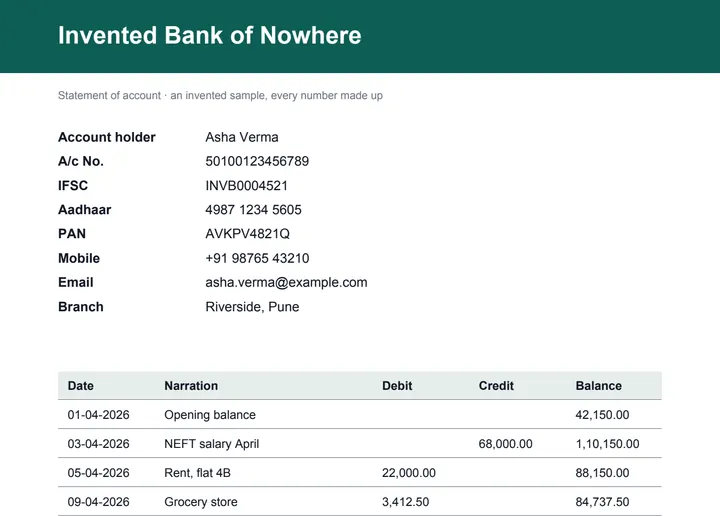 (opens the sample PDF in a new tab)
Aadhaar 4987 1234 5605, PAN AVKPV4821Q, A/c 50100123456789, IFSC INVB0004521.
Black boxes where the numbers were, and no
trace of them in the file's text or bytes.
What this tool does
Choose a PDF of up to 50 MB and 300 pages. This page reads its text on your device and suggests what to remove: Aadhaar numbers (checked with the Aadhaar checksum), PAN, IFSC codes, GSTIN, voter IDs, passport lines, mobile numbers, email and UPI ids, card numbers (checked with the card checksum) and account numbers. Untick anything you want to keep, search for any other word or pattern, draw boxes over photos, signatures or text in a scan, or blank whole pages. Review the list of marks, then apply. Every page with a mark is rebuilt as a picture with the boxes painted in, so the words underneath are gone from the file, not hidden under a shape; pages without a mark are copied as they were, minus comments and form fields. The document's author, title, bookmarks, attachments, form data and scripts are dropped. Text you did not mark can stay searchable. Nothing is uploaded, and there is no mark on your file.
What happens to your file
Your file never leaves your device. This page opens it, changes it and saves the result in your browser; nothing is uploaded, so there is no copy on our servers to delete.
No AI provider sees it either. The page sends us one count that a run happened — no file, no name, no size. Details on the privacy page.
Questions
Is the text really gone, or just covered?
Gone. A page with a mark is rebuilt as a picture of the page with the boxes painted in, and that picture replaces the page: the original text, fonts and images of that page are not in the new file. Copy, search or open the file in any editor and the redacted words are not there. Pages without a mark are copied as they were, minus comments and form fields.
Is my PDF uploaded?
No. The PDF is read, redacted and saved by your browser, with pdf.js and pdf-lib downloaded from this site when you choose the file. The only thing we are told is that a run happened — not the file, its name, its pages or what you marked.
What does it find on its own?
Aadhaar numbers (only ones that pass the Aadhaar checksum), PAN, IFSC codes, GSTIN, voter ID numbers, passport machine-readable lines, Indian mobile numbers, email and UPI ids, card numbers (only ones that pass the card checksum) and account numbers written after "A/c" or "Account". Indian passport numbers can be switched on too. Anything else you can search for, as plain text or a regular expression, or cover with a box.
What are the limits?
A scanned PDF has no text to search, so draw boxes over what must go — there is no OCR here yet. A redacted page becomes a picture, so the file grows and text you did not mark on that page stays searchable only if you keep that option on; text that touched a mark is removed from the search layer too. Bookmarks are dropped. On pages you did not mark, hidden layers are kept as they were; comments and form fields are removed everywhere.
Is there a watermark?
No mark is drawn on your file beyond your own boxes. Its metadata records that it was made at filedone.ai with no AI involved, which detectors you used, and a provenance id — nothing else about you or the original document.
Related tools
- Convert PDF pages to JPG or PNG imagesTurn the pages of a PDF into JPG or PNG pictures at 72, 150 or 300 dpi — every page or just the ones you pick. It happens on your own device: the PDF is never uploaded.
- Convert JPG or PNG images to a PDFPut photos, scans and screenshots into one PDF, a page each, in the order you choose. It happens on your own device: the pictures are never uploaded.
- Edit the text in a PDFSay what should change — a date, a name, a price — and get the same PDF back with those words rewritten in place, matching the font. Removed from our servers after 2 hours.
- Convert a bank statement PDF to ExcelUpload a bank statement PDF and get the transactions back as a spreadsheet, one row each, with the running balance intact. Your file is deleted after two hours.
- Blur, pixelate or black out part of an imageHide a name, a number, a face or a number plate: drag a box over it and blur it, pixelate it or black it out. Runs in your browser; nothing is uploaded.
Protect & sign
Guides, sample files and comparisons
- Sample bank statement PDF · free sample file
- Sample scanned rental agreement · free sample file
- filedone vs Adobe Acrobat · comparison