Sample scanned PDF for OCR testing
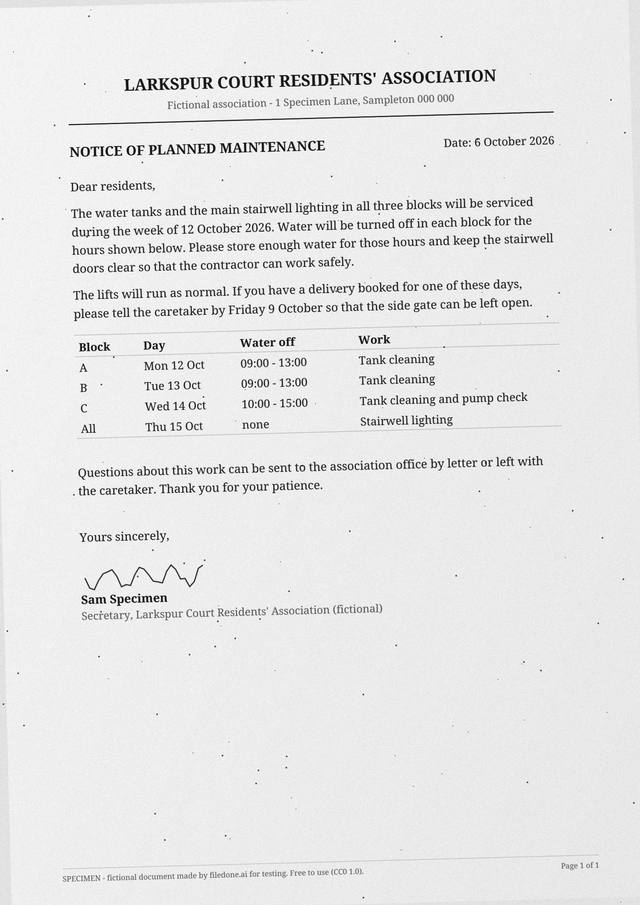
This is a one-page PDF that is a picture of a page and nothing else: there is no text layer, so nothing on it can be selected or searched until OCR reads it. It was made to behave like an office scanner's output — grayscale, 200 dots per inch, turned 1.5 degrees, with grain, dust and a slightly darker corner — and it is free to download and reuse.
1 pagePDF 294 KBimage only, no text layer200 dpiCC0
Download
- sample-scanned-page.pdfPDF, 1 page, image only · 294 KBDownload PDF
- sample-scanned-page.jpgJPG, 1654 × 2339 px · 292 KBDownload JPG
Free, no sign-up. Released under CC0 1.0: copy it, change it and use it anywhere.
What is in the file
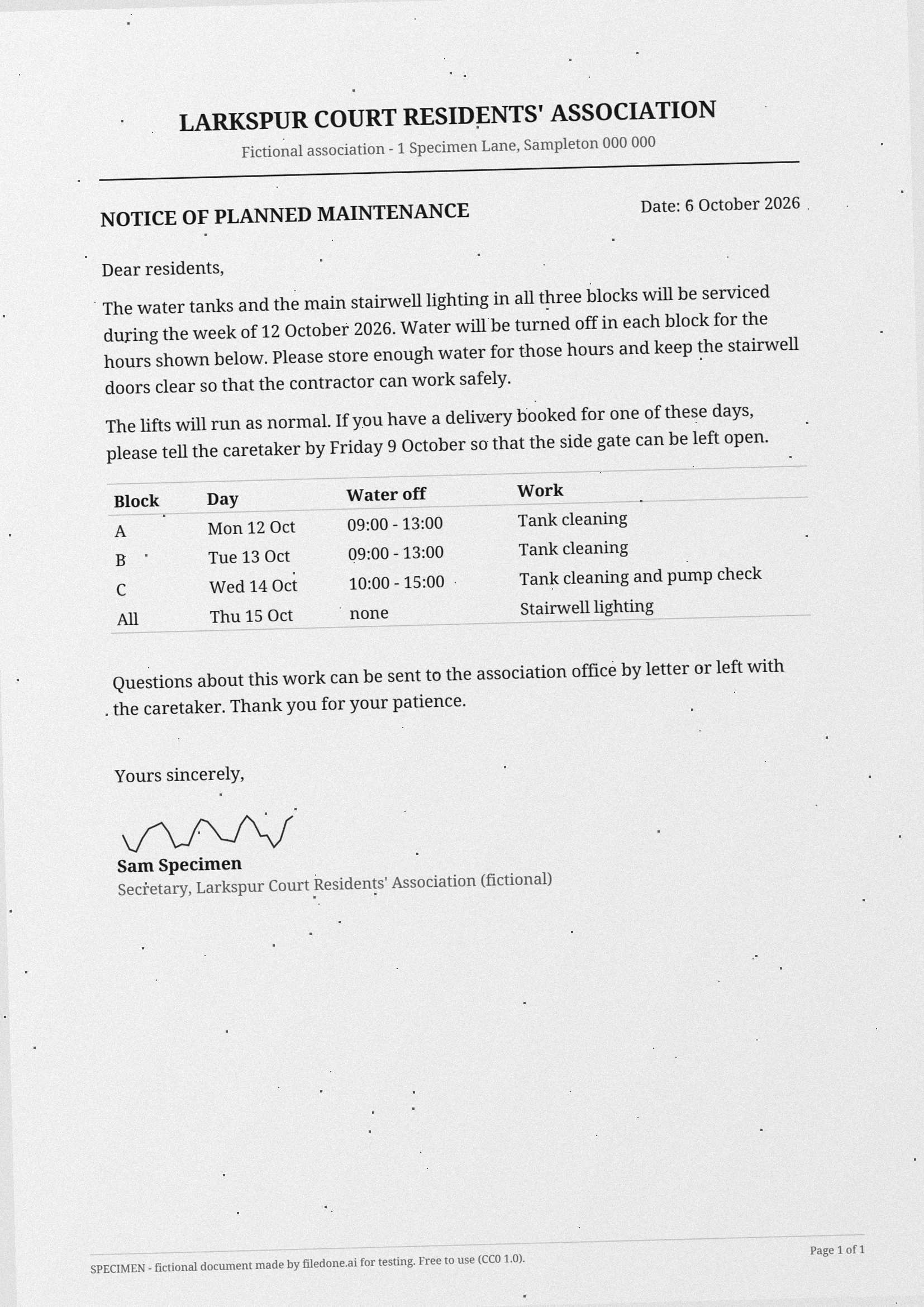
A notice from a fictional residents' association about water tank cleaning: a letterhead, a date, four short paragraphs, a four-row table of blocks, days and hours, and a signature. It is the kind of page people scan and then need as text.
The table is there on purpose. Plain paragraphs are easy for OCR; a table with ruled lines and a time range in each row is where reading order and column alignment start to go wrong, so the same file tests both.
The facts
Measured from the file itself by the script that made it.
| Pages | 1 |
|---|---|
| Files | sample-scanned-page.pdf (294 KB), sample-scanned-page.jpg (292 KB) |
| Text layer | None: each page is an image only, so a tool needs OCR to read it |
| Page size | A4 (210 × 297 mm) |
| Resolution | 200 dpi |
| JPG size in pixels | 1654 × 2339 |
| Colour | Grayscale |
| Skew | 1.5° anticlockwise |
| Language | English |
| Fictional | Everything: every company, person, address, number and figure is invented, and every page says SPECIMEN |
| Licence | CC0 1.0 (public domain) |
What to test with it
- Read the text out of it in your browser with Scanned PDF to text, or the JPG with Image to text.
- Give it a hidden text layer, so it can be searched and copied, with Make a scanned PDF searchable.
- Change the date "6 October 2026" without retyping the page in Edit the text in a scanned PDF (8 credits a job).
- See how far a scan can be squeezed with Compress a PDF to 100 KB.
- Turn it into an editable Word file with PDF to Word, which charges 1 credit for each scanned page.
Licence, and who is in it
Nobody. Every company, person, address, account number and figure in the file was made up by the script that drew it, and every page carries the word SPECIMEN and a line saying it is fictional; the PDF's metadata says so too. The file is dedicated to the public domain under CC0 1.0, so you can use it in tests, demos, courses and products without asking. Last updated 8 October 2026.
Questions
Why does it have no text layer?
Because that is what makes it a test of OCR. The page was drawn, rendered to pixels and saved as a JPEG inside the PDF, the way a scanner does it. A tool that finds text in it without OCR is reading something that is not there.
Why is it skewed and grainy?
Real scans are rarely straight or clean. The 1.5-degree turn, the grain and the specks test whether a tool straightens the page and ignores dust before it reads, rather than only working on perfect input.
Can I use this file in my own tests, product or course?
Yes. It is released under CC0 1.0, a public-domain dedication: copy, change, redistribute and use it commercially, with no need to ask and no need to credit filedone (a link is welcome).
Is anything in it real?
No. Every company, person, address, account number, tax number and figure was invented by the script that made the file. Every page says SPECIMEN and that it is fictional, and so does the PDF's metadata.
Open it in
- Scanned PDF to text — OCR a scan into editable textRead the text out of a scanned PDF with OCR, page by page, free in your browser: English, Hindi, Marathi, Bengali, Tamil, Telugu. Handwritten pages read by AI for 1 credit a page.
- Make a scanned PDF searchable — OCR, free, no uploadAdd an invisible text layer to a scanned PDF so you can search it, select words and copy them. English, Hindi and four more Indian languages. Free, and the file stays on your device.
- Image to text — copy the text from a photo, scan or screenshotTurn a photo, scan or screenshot into text you can copy and edit, in English, Hindi, Marathi, Bengali, Tamil or Telugu. Free and on your device; handwriting read by AI for 1 credit.
- Edit the text in a scanned PDFChange wording on a scan: the old words are painted out to match the paper and the new ones are typeset in a matching font. Your file is deleted after two hours.
- Compress a PDF to 100 KBBring a PDF under 100 KB for an exam, job or government portal, without uploading it. Text stays selectable; only the pictures and scans inside are made lighter.
- Convert PDF to WordTurn a PDF into an editable Word (.docx) file with its fonts, colours and tables. Pages with text are free with a free account; a scanned page is 1 credit.
Guides
- Can you edit the text in a scanned PDF?
- How to edit a scanned PDF without retyping it
- How to compress a PDF to under 100 KB