Edit the text in a scanned PDF
Change a date, an amount or a name on a scanned page and keep the scan: only the old words are painted out and the new ones drawn in a matching font. 8 credits a job, shown first.
Edit the text in a scanned PDF
Drop a PDF or a picture here
It opens on this page. Click any words to change them, or say what should change.
PDF, PNG or JPG · one file
or paste it here (Ctrl+V)
Nothing is uploaded until you make a change with the AI, or download.
How to edit the text in a scanned PDF
- Sign in (new accounts get 20 free credits) and choose your scan: a PDF, or a photo or scan of the page as a JPG or PNG.
- Say what to change in one line, such as: change 12 March 2026 to 14 March 2026. The price is shown before anything runs.
- Compare the changed lines with the original, adjust any that need it, and download the PDF. Outside the changed lines, every pixel is your original scan.
Before and after
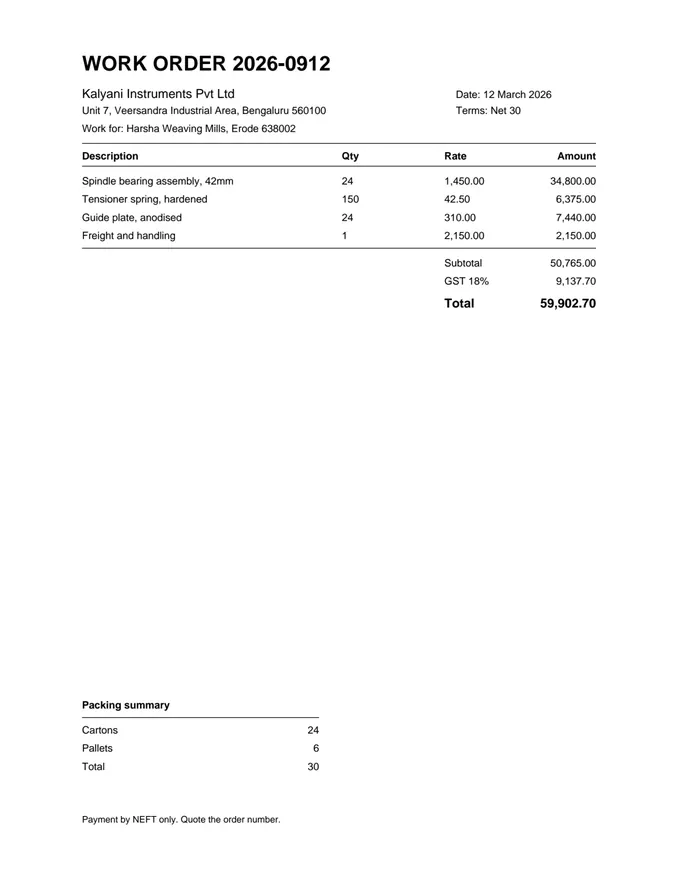
One line on a scan rewritten; the paper around it is the original scan.
 (opens the sample PDF in a new tab)
The line that changes: “Date: 12 March 2026”
WORK ORDER
Date: 14 March 2026
What this tool does
Use this when your PDF is a picture of a page — a scan, a photocopy or a phone photo — rather than a document with text in it. The page is read with OCR so the words you name can be found. The old words are then painted out, filling in the paper behind them from what surrounds them, and the new words are drawn in their place in the nearest matching font, at the size of the ink on the page. Only the lines you asked to change are touched: each one is a small patch laid over your scan, and every pixel outside those patches is your original. Faces are never painted over. The file says it was edited with AI in its metadata, with a signed provenance manifest beside it; there is no visible mark on the pages. If the page shows a real person, place or event, the PDF you download has been changed by AI — tell anyone you pass it to.
The edited file is an AI-manipulated version of your document. It is marked as AI-edited in its metadata; using it to misrepresent a real document is prohibited by our rules.
What one run did to our sample scan
On our sample scan, one instruction changed one line and left the rest of the page as it was scanned. The input was the invented work order this page shows below: one A4 page, 200 dpi, an image with no text layer, 124,445 bytes.
The page was read with OCR, the old date was painted out by filling in the paper around it, and the new date was typeset over it as a small patch. The run asked no language model to plan the change: a one-line "change X to Y" is understood by a free local rule first.
| What | In this run |
|---|---|
| Instruction | change "Date: 12 March 2026" to "Date: 14 March 2026" |
| Lines changed | 1, on page 1 |
| Read by | Google Document AI (OCR) |
| Old words removed by | An OpenCV fill, on our own servers |
| Visible mark on the page | None |
| What the file says | Edited with AI, in its metadata, with a signed provenance manifest beside it |
Patch the scan, or convert it to Word?
Patch it when only a few words must change and the page must still look like the scan; convert it when you need to rewrite whole paragraphs. Converting (PDF to Word, or OCR in a PDF editor) rebuilds the page as new text in the fonts the software has, so the look changes and every OCR mistake lands in the text. Patching leaves the scan alone and redraws only the changed words.
Our comparisons with Adobe Acrobat, Sejda, iLovePDF and Smallpdf, under Alternatives at the foot of every page, say how each of them handles a scan, from their own help and pricing pages.
| Patch the scan (this page) | Convert, then edit | |
|---|---|---|
| Does the page still look like the scan? | Yes, outside the changed words | Usually not: fonts and spacing change |
| Can you rewrite whole paragraphs? | No: a line or a few words at a time | Yes |
| Are OCR mistakes left in the page? | No: only the changed words are redrawn | Yes, in the new text |
| Price here | 8 credits a job | PDF to Word: 1 credit a scanned page |
What it will not edit
Some documents are refused at any price, and some edits come out less well; the page says which before you are charged.
- Refused: identity documents, passports, licences, currency, anything with an official seal or stamp, court papers, medical records, and degrees or mark sheets from real institutions.
- Faces are never painted over, and handwriting is not rewritten in matching handwriting.
- A scan below about 150 dpi, or a blurred phone photo, gives OCR too little to read.
- A word printed over a photo, a pattern or a heavy stain is harder to paint out cleanly; check it before you use the file.
What happens to your file
Deleted from our servers after 2 hours. We do not train AI on your files, and the terms of our AI providers do not allow them to; they may keep request logs for up to 55 days, longer for a request they flag for abuse.
Uploads and outputs are deleted after 2 hours, whether or not you download them. Provider request logs are kept for at most 55 days. Details on the privacy page.
Questions
Will people be able to tell the page was edited?
Not by looking at it: there is no visible mark on the page. The file's metadata says it was edited with AI and which pages changed, and a signed provenance manifest you can check with any C2PA reader comes with it, so software can tell. If you pass the file on, say that it was edited with AI. We do not offer a way to remove the metadata.
Do I need an account?
Yes. Every run costs credits, so every run needs an account. Signing up is free, and new accounts get 20 credits, at 8 credits a job, each one the clean file.
What does it cost?
8 credits a job, which covers up to 10 pages; each page after that is 0.8 credits. The price is shown before anything runs, and nothing is charged for a run that does not finish.
Do you re-encode my scan?
No. The page image you uploaded stays in the file exactly as it was. Each line you changed is a small patch laid on top of it, so outside those patches every pixel is your original scan, with no second round of compression.
What is LaMa, which the result sometimes mentions?
LaMa is an open-source inpainting model that runs on our own servers and fills in textured paper behind a removed word when a simple fill would leave a smudge. It runs on our own servers, so that step sends nothing to an outside image model.
Related tools
Edit the text in a PDF, a poster or an invitation
Edit a document
Guides, sample files and comparisons
- Can you edit the text in a scanned PDF? · guide
- How to edit a scanned PDF without retyping it · guide
- How to change a date or an amount in a PDF · guide
- Sample scanned PDF for OCR testing · free sample file
- filedone vs Adobe Acrobat · comparison
- filedone vs Sejda · comparison
- filedone vs iLovePDF · comparison
- filedone vs Smallpdf · comparison