Image to text — copy the text from a photo, scan or screenshot
Copy the text out of a photo, scan or screenshot, free and in your browser, in English, Hindi, Marathi, Bengali, Tamil or Telugu. Our sample receipt photo was read in 1.7 seconds.
Drop a picture here
PNG, JPG or WebP · one file, up to 20 MB
No file to hand?
or paste it here (Ctrl+V)
Nothing is uploaded: it all happens in this browser.
The values in this file were read from your document by AI, and they can be wrong — check them against the original before you rely on them. Your document itself is not altered.
How to copy text from an image
- Drop a JPG, PNG or WebP picture of up to 20 MB, choose one from your phone, or paste a screenshot with Ctrl+V (⌘+V on a Mac).
- Pick the language it is printed in. An Indian language is read together with English, because Indian print mixes the two.
- Correct anything the reader got wrong in the text box, then copy the text or download it as a .txt file.
Before and after
A notice in two scripts, and the text you can copy out of it.
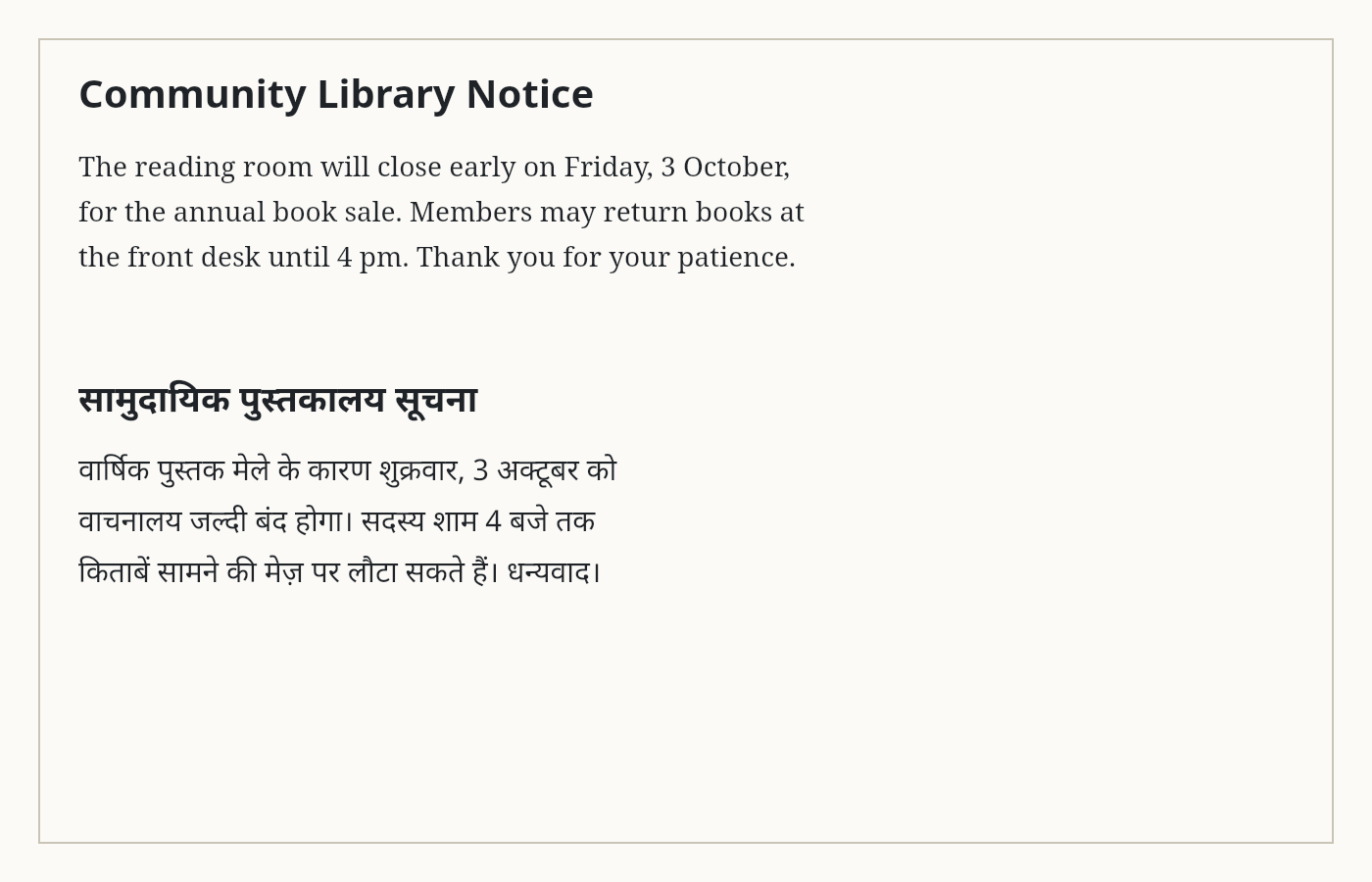
The reading room will close early on Friday, 3 October,
वार्षिक पुस्तक मेले के कारण शुक्रवार, 3 अक्टूबर को
What this tool does
This tool reads the printed text in a picture and gives it back as text you can copy, edit and download. Drop a photo of a page, a scanned document or a screenshot — or paste a screenshot straight from the clipboard — and pick the language it is printed in: English, Hindi, Marathi, Bengali, Tamil or Telugu. An Indian language is read together with English, because Indian print mixes the two. The reading is done by Tesseract, an open-source OCR engine, running in your own browser: the engine and the language you choose are downloaded once from this site (about 1.5 MB, plus 0.5 to 2 MB per language), and the picture is never uploaded. The result appears in a box you can correct before you copy it or download it as a .txt file; "Keep line breaks" keeps one line per printed line, or joins each paragraph into one. Tesseract is made for print and reads handwriting poorly, so for a handwritten note there is a second button, "Read it with AI" (1 credit a picture, signed in): only when you press it, the picture is uploaded to our server and read by an AI model, its text goes into the same box, and the upload and the text are deleted after 2 hours. A word the AI cannot read is marked [illegible].
The values in this file were read from your document by AI, and they can be wrong — check them against the original before you rely on them. Your document itself is not altered.
How long it took on our sample files
A clear picture of a printed page is read in a few seconds on a computer; a phone takes longer, because the reading is done on the device. These are the times this page reported, from the file chosen to the text ready.
| Sample picture | Size | Words read | Time |
|---|---|---|---|
| Receipt, phone photo | 1,200 × 1,600 px, 165 KB | 53 | 1.7 s |
| Scanned invoice | 1,654 × 2,339 px, 274 KB | 187 | 3.3 s |
| Library notice, Hindi and English | 1,400 × 900 px | 64, mean confidence 94% | Recorded run |
How to get a better read
OCR reads shapes, so the picture decides most of the result: a sharp, straight, well-lit photo of printed text reads nearly every word, and a blurred or tilted one does not.
- Hold the phone straight over the page, not at an angle, and fill the frame with the text.
- Use daylight or a bright lamp, and avoid the shadow of your phone.
- Pick the right language. Hindi printed text read as English comes out as nonsense.
- Handwriting reads poorly with the free reader; use "Read it with AI" (1 credit) for it.
Image to text, scanned PDF to text or a searchable PDF?
All three read text with the same OCR engine in your browser; they differ in what you start with and what you get back.
| You have | You want | Use |
|---|---|---|
| A photo, scan or screenshot | The words, to copy or edit | Image to text (this page) |
| A scanned PDF | The words, page by page | Scanned PDF to text |
| A scanned PDF | The same PDF, but searchable and selectable | Make a scanned PDF searchable |
What happens to your file
The free reading: your file never leaves your device.The text reader is downloaded to your browser and reads it there; the page sends us one count that a run happened — no file, no name, no size.
Reading it with AI (1 credit a page): only when you press it, your file is uploaded to our server and sent to an AI provider to make the result. Deleted from our servers after 2 hours. We do not train AI on your files, and the terms of our AI providers do not allow them to; they may keep request logs for up to 55 days, longer for a request they flag for abuse.
Uploads and outputs are deleted after 2 hours, whether or not you download them. Provider request logs are kept for at most 55 days. Details on the privacy page.
Questions
Which languages can it read?
English, Hindi, Marathi, Bengali, Tamil and Telugu. Pick the language the text is printed in; an Indian language is read together with English by default, so names, numbers and email addresses in English come out right too. Under More options you can turn the English off for text that is all in one script.
Is my picture uploaded?
Not by the free reading. Its OCR engine runs in your browser, and the picture is read on your device; the engine and the language files are downloaded from this site the first time you use them. Only if you press "Read it with AI" is the picture uploaded, to our server and an AI provider, and the upload and the text are deleted after 2 hours.
How accurate is it?
On a sharp, straight picture of printed text it is usually right on nearly every word. Blurry, tilted or very small text reads worse, so check the result — the text is in a box you can correct before you copy it. A photo taken straight on, in good light, reads best. Handwriting is read far better by "Read it with AI" (1 credit a picture).
Can I paste a screenshot?
Yes. Copy a screenshot (or any picture) and press Ctrl+V — ⌘+V on a Mac — anywhere on the page. You can also drop a JPG, PNG or WebP file, or choose one from your phone.
Is there a limit?
One picture at a time, up to 20 MB. A picture over 16 megapixels is read at 16, which is plenty for printed text. The free reading has no account and no daily limit, because it runs on your device; reading it with AI needs an account and costs 1 credit a picture.
Related tools
- Scanned PDF to text — OCR a scan into editable textRead the text out of a scanned PDF with OCR, page by page, free in your browser: English, Hindi, Marathi, Bengali, Tamil, Telugu. Handwritten pages read by AI for 1 credit a page.
- Turn a screenshot of a table into ExcelUpload a screenshot or a photo of a table and get the rows and columns back as a spreadsheet you can sort and sum. Your file is deleted after two hours.
- Compress an image to a target size in KBMake a photo smaller than 20, 50, 100 or 200 KB — or any size you type — without uploading it. Or pick a quality and see the size first.
- Redact a PDF — remove Aadhaar, PAN and account numbers for goodBlack out Aadhaar, PAN, IFSC, account and card numbers, phones and emails in a PDF, or any word, area or page. Marked text is removed from the file, not covered, and the PDF is never uploaded.
Tables & text out of a document
Guides and free sample files
- Sample scanned PDF for OCR testing · free sample file
- Sample scanned invoice · free sample file
- Sample receipt · free sample file