Convert a PDF to text
Drop a PDF here
PDF · one file, up to 50 MB
No file to hand?
or paste it here (Ctrl+V)
Nothing is uploaded: it all happens in this browser.
Before and after
A PDF in, its text out.
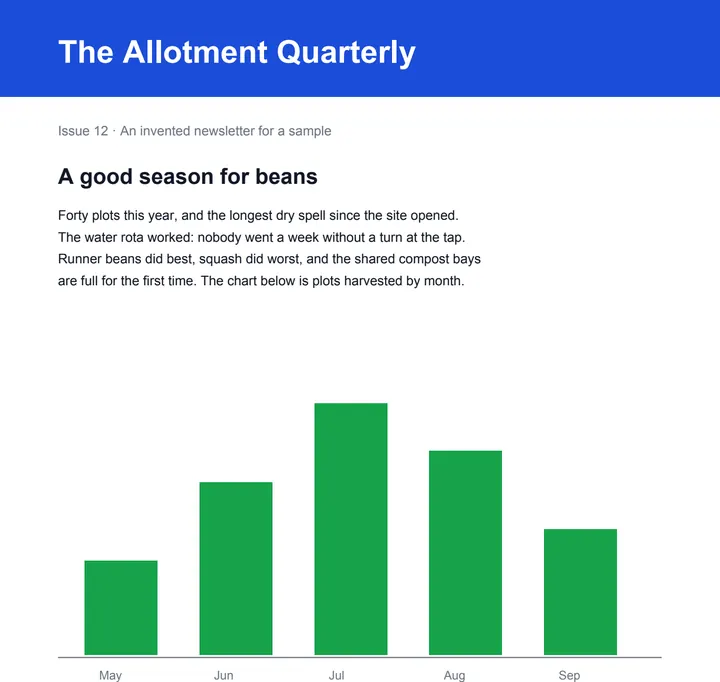 (opens the sample PDF in a new tab)
Page 1 of 2: text, a bar chart and a table.
The words in reading order, line by line,
the table's columns apart by tabs.
What this tool does
Choose a PDF of up to 50 MB and 300 pages and its text appears on the page, ready to copy, and as a .txt file to download. The text is read from the PDF's own text layer with pdf.js — the PDF library Firefox uses — and put back in reading order, line by line from the top of each page; a table's columns are kept apart by tabs, so a row pastes into a spreadsheet as cells. Under More options you can choose the pages, mark where each page starts, and join the lines of each paragraph into one. A PDF whose pages are pictures — a scan, or photos of pages — has no text layer, and the page says so rather than giving you an empty file: reading words off a picture needs OCR, which this page does not do. Everything happens in your browser with a PDF library that downloads to your device when you choose the file: nothing is uploaded, and there is no AI in it.
What happens to your file
Your file never leaves your device. This page opens it, changes it and saves the result in your browser; nothing is uploaded, so there is no copy on our servers to delete.
No AI provider sees it either. The page sends us one count that a run happened — no file, no name, no size. Details on the privacy page.
Questions
Is my PDF uploaded?
No. The text is read by your browser, on your device, with pdf.js, a PDF library downloaded from this site when you choose the file. The only thing we are told is that a run happened — not the file, its name or its text.
Why does it say my PDF has no text?
Because its pages are pictures: a scan, or photos of pages saved as a PDF. There are no letters in the file to take out, only pixels, and reading them needs OCR (text recognition), which this page does not do. A PDF made from a document on a computer has a text layer and works here.
Will tables and columns come out right?
Lines come out in reading order, top to bottom and left to right, and a table's columns are kept apart by tabs, so a row pastes into a spreadsheet as cells. A page set in two columns side by side is read across both columns, line by line; to pull a table out as a spreadsheet, use PDF to Excel.
Why are some words garbled?
Some PDFs store each letter as a shape without saying which letter it is — common with older Hindi and other Indian-language fonts, and with some scanned-and-edited files. The text that comes out is then whatever the file claims, which can be nonsense; OCR on the page's picture is the way round it.
Can I use a PDF with a password?
Not until it is unlocked: a PDF with a password, or one whose owner has locked copying its text, is refused with a sentence saying so. Otherwise one PDF at a time, up to 50 MB and 300 pages.
Related tools
- Convert PDF to WordTurn a PDF into an editable Word (.docx) file with its fonts, colours and tables. Pages with text are free with a free account; a scanned page is 1 credit.
- Convert a PDF table to ExcelExtract the tables from a PDF into Excel, every value in its own cell, merged cells kept and doubtful cells flagged. Your file is deleted after two hours.
- Translate a PDF, keeping the layoutGet the same PDF back in English, Hindi, Kannada, Tamil and more: every line translated where it stands, with numbers, dates and codes kept as written.
- Convert PDF pages to JPG or PNG imagesTurn the pages of a PDF into JPG or PNG pictures at 72, 150 or 300 dpi — every page or just the ones you pick. It happens on your own device: the PDF is never uploaded.
- Edit the text in a PDFSay what should change — a date, a name, a price — and get the same PDF back with those words rewritten in place, matching the font. Removed from our servers after 2 hours.
- Redact a PDF — remove Aadhaar, PAN and account numbers for goodBlack out Aadhaar, PAN, IFSC, account and card numbers, phones and emails in a PDF, or any word, area or page. Marked text is removed from the file, not covered, and the PDF is never uploaded.
Tables & text out of a document
Guides and free sample files
- Sample invoice PDF · free sample file