AI headshots from your selfies
This AI headshot generator turns one to four selfies into professional headshots for LinkedIn, a CV or a team page. They are new pictures of you made by AI, and each is marked as AI-generated.
Free account · 20 free credits. Sign in or sign up
Drop pictures here
PNG, JPG or WebP · up to 4 files
or paste it here (Ctrl+V)
Nothing is uploaded until you press Make my headshots.
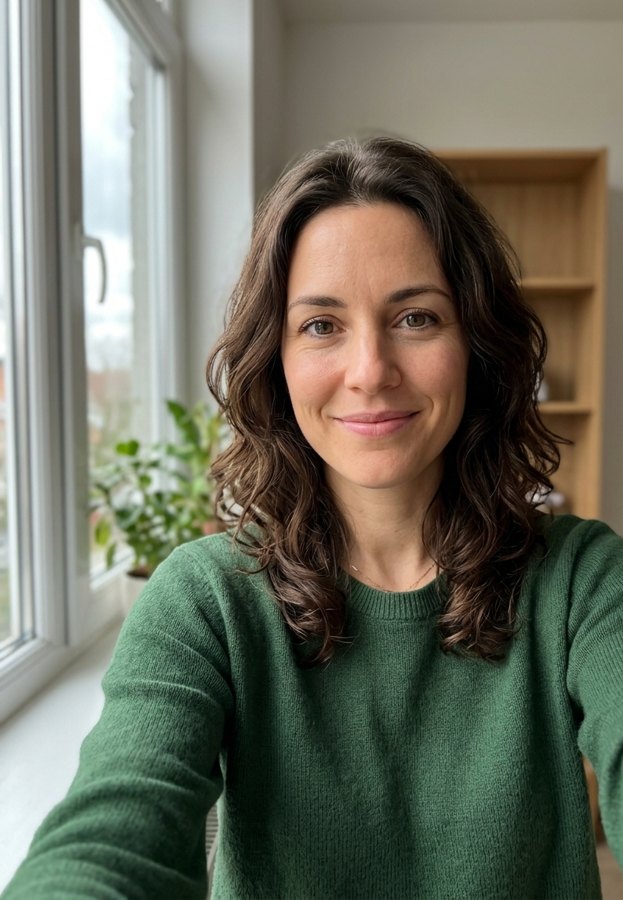
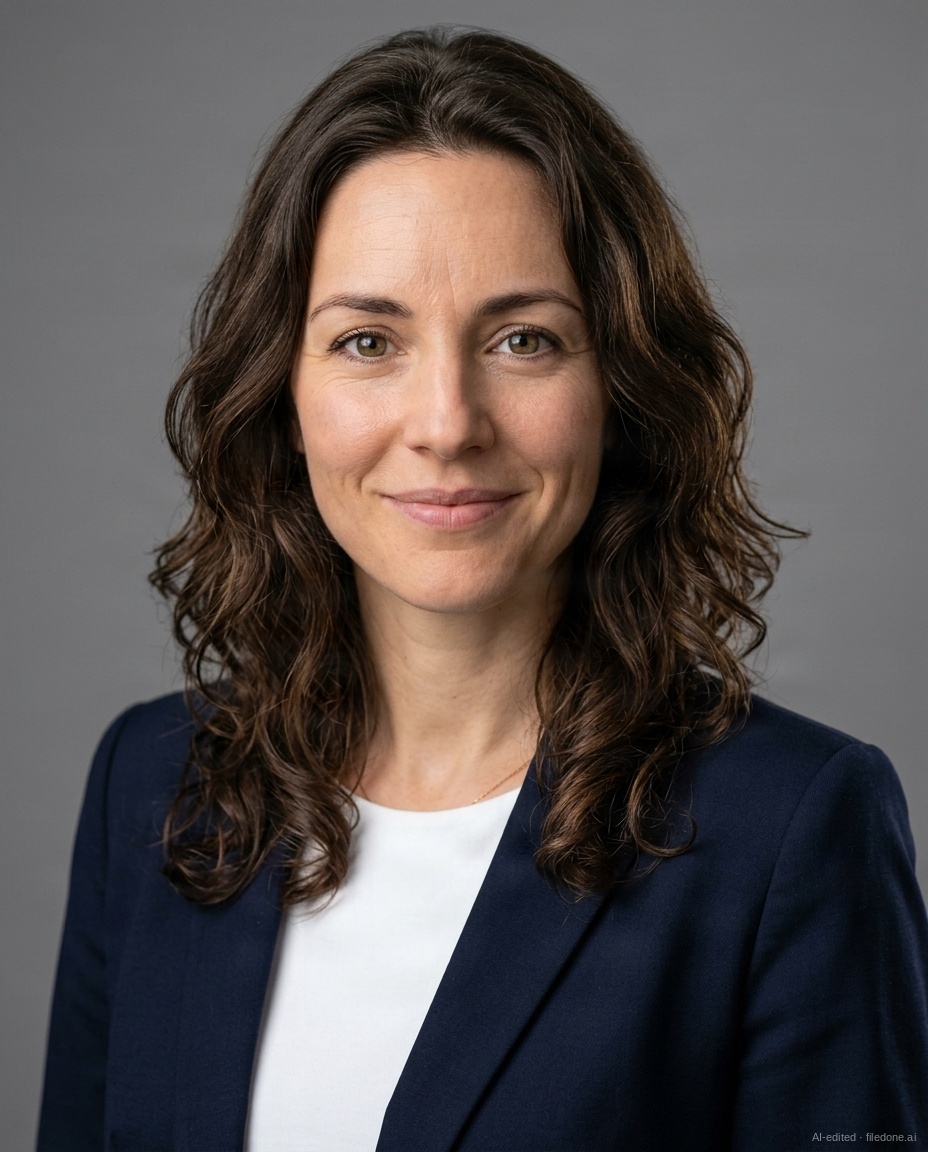
Four selfies of an invented person (made by AI for this sample, not a real person) in, four corporate-grey headshots out. One of the four is shown.
How to make a professional headshot from a selfie
- Sign in (the account is free), then add one to four photos of just you: straight on, in good light, no sunglasses. Two to four photos keep your likeness best.
- Pick a look (Corporate grey, Studio white, LinkedIn blue, Bright office, Outdoor or Black and white) and how many: 4 headshots for 20 credits or 8 for 34. Outfit and framing are under More options.
- Tick the box to confirm the photos are of you and press Make my headshots. Download the ones you like, one by one or as a zip, within two hours; after that they are deleted.
Before and after
What goes in and what comes out.
 (opens the sample image in a new tab)
One to four everyday photos of you: at home, by a window, on your phone. Just you in each one.
 (opens the recorded result in a new tab)
4 or 8 new, studio-style pictures of you on the backdrop and in the outfit you picked, each marked as made by AI.
What this tool does
Turn a selfie into a professional headshot for LinkedIn, your CV or a team page. Drop one to four photos of yourself — straight on, good light, no sunglasses, just you — pick a look (Corporate grey, Studio white, LinkedIn blue, Bright office, Outdoor or Black and white), choose 4 headshots for 20 credits or 8 for 34, and tick the box to confirm the photos are of you. An AI model then makes new pictures of you in that setting and outfit. They are wholly AI-generated: each one carries a small "AI-generated · filedone.ai" mark in the corner and metadata saying it was made by AI, and there is no option to remove either. Before anything is made, every photo is checked: one face, an adult, a real photo and not a drawing or a screenshot, not a public figure, nothing explicit; a photo that fails is refused and nothing is charged. It needs a free account. Your selfies go to our AI providers for this one run, which do not train on them, and our copies and the headshots are deleted after two hours, so download them (one by one or as a zip) before then.
If this image shows a real person, the result is an AI-manipulated image of that person. It is labelled as AI-edited in its metadata, and you are responsible for having their consent.
AI headshots vs a photographer: which should you use?
Use AI headshots when you want a clean, current picture for LinkedIn, a CV or a team page without booking a shoot; use a photographer when you need a real photograph of you.
An AI headshot is a new picture made from your selfies. It can put you in front of a studio backdrop or in an office, in business clothes, without a camera session, but it is not a record of a moment that happened. A photographer takes real photographs, directs your pose and the light, and can photograph a whole team in one style.
For a passport, a visa or an ID card you need a real, unaltered photo, so use a photograph there, not an AI headshot.
| Compared | AI headshots here | A photographer |
|---|---|---|
| What you get | 4 or 8 new pictures of you, made by AI from your selfies | Real photographs of you, taken by a person |
| What you need | 1 to 4 selfies and a free account | A booked session, in a studio or where you work |
| Cost | 20 credits for 4, 34 credits for 8 | Their fee for the session |
| Choice of look | Six looks, three outfits and two framings | What the studio and your wardrobe allow |
| Marked as AI | Yes: a small corner mark and metadata | No: it is a photograph |
| Passport, visa or ID | Not suitable: use a real photo | Suitable if the photo meets the rules |
Is there a free AI headshot generator?
Yes, but free AI headshot generators usually come with a limit — a few pictures a day, one full-size download or a long wait — and this page is not free: it runs on credits. Paid generators tend to sell a one-off pack or a subscription and make dozens of headshots per order.
Whichever you use, check three things before you upload a selfie: how long the site keeps your photos, whether they are used to train AI, and whether the results are marked as made by AI. Here the answers are two hours on our servers, no, and yes.
| Compared | Free generators | Paid generators | This page |
|---|---|---|---|
| Cost | Nothing, up to a limit | A one-off price or a subscription | 20 credits for 4 headshots, 34 for 8 |
| How many | Often one or two a day, or one full-size download | Often dozens per order | 4 or 8 each time, from 1 to 4 selfies |
| Account | Often not needed | Usually needed | Needed, and free; new accounts get 20 credits |
| Your photos afterwards | Varies by site: from hours to weeks, or until you ask | Varies by site: from hours to weeks, or until you ask | Deleted from our servers after two hours |
Can you use an AI headshot on LinkedIn?
Yes, if it looks like you: LinkedIn's Professional Community Policies ask that your profile photo is your own likeness, not an image of someone else.
Choose the headshots that look like you do on a video call rather than the most flattering one, because a recruiter or a client who meets you should recognise you. The same goes for a CV or a job application that asks for a formal photo, as long as it does not require a real photograph.
- For a profile picture: LinkedIn blue, Corporate grey or Studio white, for a plain backdrop.
- For a team page or a website: Bright office or Outdoor, for a setting.
- Head and shoulders, the default framing, suits a small round picture; Waist up, under More options, suits a larger one.
What happens to your file
Deleted from our servers after 2 hours. We do not train AI on your files, and the terms of our AI providers do not allow them to; they may keep request logs for up to 55 days, longer for a request they flag for abuse.
Uploads and outputs are deleted after 2 hours, whether or not you download them. Provider request logs are kept for at most 55 days. Details on the privacy page.
Questions
What does it cost?
4 headshots for 20 credits, or 8 for 34. The price is on the button before you run it. The credits are only taken when the headshots are ready; if a photo is refused or the run fails, nothing is charged, and if fewer headshots than you paid for pass our checks, you pay only for the ones you get. It needs a free account, and new accounts get 20 credits.
What happens to my photos, and are they used to train AI?
They are not used to train any model, and our copies of your selfies and headshots are deleted after two hours, so download the headshots before then. Your selfies go to our AI providers for this one run, to be checked and turned into headshots; the copies we send are re-encoded first, which drops location and camera details, and the providers keep request logs for at most 55 days, longer only for a request they flag for abuse. We keep no face data: no face print, no template, only the fact that one face was found.
Can I make headshots of someone else?
No. This tool is only for photos of yourself, and you confirm that on every run: it is not for making pictures of another person, a celebrity or anyone under 18. Photos that show anyone else, or look like a child, a public figure, a drawing or a screenshot, are refused before anything is made, and an account that keeps sending photos of children or explicit photos loses access to the tool. If a headshot of you was made without your consent, report it on our Grievances page and we will take it down.
Will the headshots look like me?
They are made to: the model is given your selfies and told to keep your face, features, skin tone and hair as they are. It works best from two to four clear photos, taken straight on in good light with only you in them. Each headshot is a new picture, not a retouch, so look at each one before you use it and download only the ones you like. To try a different look with the same photos, run it again; each run is charged at its pack's price.
Is there a watermark on the headshots?
Yes. Every headshot has a small "AI-generated · filedone.ai" mark in its bottom-right corner, and there is no option to remove it, on any plan. Its metadata (C2PA and XMP) also says it was made by AI and carries a provenance id. The mark is there because each headshot is a new picture of a real person, not a photograph: if you use one where people may take it for a real photograph, tell them it was made with AI.
Related tools
- Make a passport-size photo in your browserMake a passport, visa or ID photo from a selfie: sized to the official rule, face centred, background made plain white, with a print sheet for 4×6 in or A4. Runs in your browser; nothing is uploaded.
- Remove the background from an imageRemove the background from a photo for free, with no upload and no sign-up: the AI runs in your browser. Get a transparent PNG, or white or any colour.
- Replace a photo background with AIChange a photo's background with AI: keep the person or product and put it in a new scene you pick or describe — studio, marble table, beach, café, Indian festive. 3 credits a photo.
- Crop an image into a circleCut a round picture from a JPG, PNG or WebP for a profile photo or a logo, saved as a PNG with a see-through background. Runs in your browser; nothing is uploaded.