Remove the background from an image
Remove the background from an image for free: drop it here and a small AI model on your own device cuts out the subject, with no upload. Download a transparent PNG, or put it on white or any colour.
Drop a picture here
PNG, JPG or WebP · one file, up to 12 MB
No file to hand?
or paste it here (Ctrl+V)
The free version runs in this browser: nothing is uploaded.
How to remove the background from an image
- Drop a PNG, JPG or WebP picture on the page, choose it from your phone or computer, or paste it. It can be up to 12 MB and 4,096 pixels on its longest side.
- The cut-out appears on its own, made on your device. For a photo of a person, tick "This is a photo of a person" and press the button to load the 26 MB people model, which is better on hair.
- Download the PNG with its transparent background, or first pick White, Black or Colour under More options. If the edge round hair or fur is too soft, try "Better quality" (2 credits, signed in).
Before and after
What the free, in-browser model does well, and where it falls short.
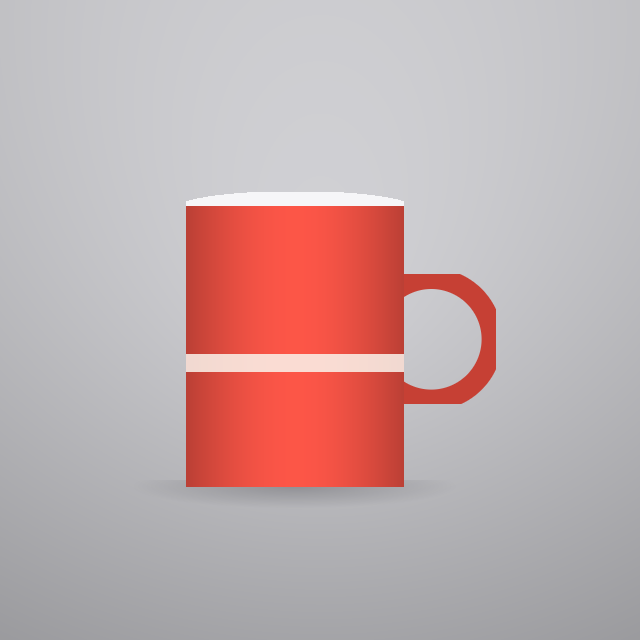 (opens the sample image in a new tab)
One opaque subject, plain backdrop, hard edges: products, logos, packaging, a person against a wall. Clean edges, usable straight away.
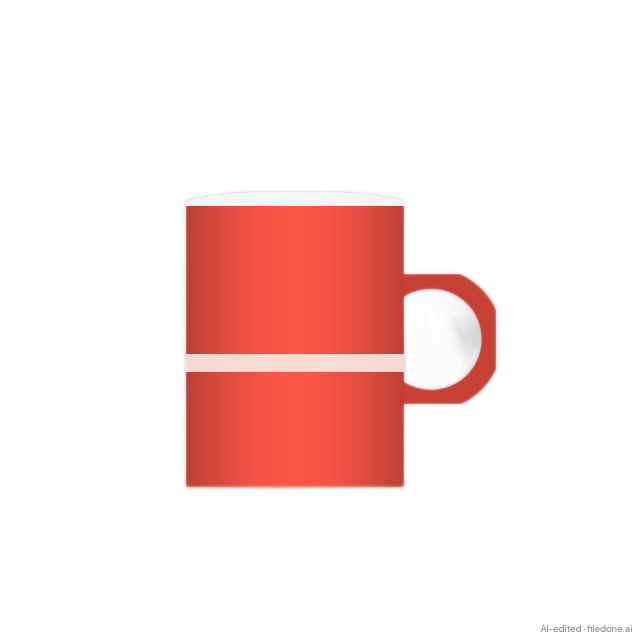 (opens the recorded result in a new tab)
Clean edges round the mug, but the hole through the handle stayed filled in. Fine hair, fur, glass, smoke and a subject the colour of its backdrop are where this free model falls short.
What this tool does
This tool separates the subject of a picture from its background and gives you a PNG with the background gone. The free version does the work in your browser: a 4.6 MB model called u2netp is downloaded once and then runs on your own processor, so for it the picture is never uploaded and we never see it. If you tick "this is a photo of a person" it downloads a second, larger model trained only on people, which is much better on hair. The free result is cleanest on products, logos and simple portraits on plain backgrounds; on fur, glass, fine hair and busy backgrounds the edge is visibly softer. For those, "Better quality · 2 credits" (signed in) sends your original to a much larger background-removal model on our server; that upload and its result are deleted after 2 hours. Every image you download carries a metadata label saying it was edited with AI — the free one also a small visible mark, the better one's transparent download a cryptographic signature — and the page tells you what that label can and cannot prove. If the picture is of a real person, the version you download has been changed by AI and carries a machine-readable mark saying so, and you should say so as well when you share it.
If this image shows a real person, the result is an AI-manipulated image of that person. It is labelled as AI-edited in its metadata, and you are responsible for having their consent.
Is this background remover free?
Yes: the version that runs in your browser is free, needs no account, and does not upload your picture. The optional "Better quality" version costs 2 credits an image, needs you to sign in, and sends your original to a much larger model on our server; new accounts get 20 credits.
Start with the free one. If the edge round hair, fur or glass is too soft, press "Better quality" and its result appears next to the free one, so you can compare them before you download.
| Free, in your browser | Better quality, on our server | |
|---|---|---|
| Cost | Free, no account | 2 credits an image, signed in |
| Your picture | Stays on your device; nothing is uploaded | Your original is uploaded, then deleted after 2 hours |
| Model | u2netp (4.6 MB), or MODNet (26 MB) for photos of people | A much larger background-removal model |
| Edges | Clean on products, logos and simple portraits; soft on hair, fur and glass | The one to try for hair, fur, glass and busy backgrounds |
| Download | PNG, transparent or on a colour you pick; JPEG once a colour is picked | Transparent PNG, or a PNG on the colour you pick |
| Visible mark | Small grey "AI-edited · filedone.ai" text in a corner | None; the transparent file is signed (C2PA) instead |
| Pictures at a time | One | One |
How do I make an image background transparent or white?
Remove the background here and the download is a PNG with a transparent background; for white, black or any other colour, open More options in the tool and pick one before you download.
The colour is drawn behind the cut-out in your browser, so changing it only redraws the picture: the model does not run again and nothing is uploaded.
- The checked pattern behind the result only shows which parts are transparent. It is on the page, not in your file.
- A JPEG cannot hold transparency, so the JPEG download appears only once you pick a colour.
- Colour opens a colour picker, so the background can be any colour you like, such as a brand colour.
- The "Better quality" cut-out takes the same colour. That version is put together in your browser, so it carries the metadata label but not the signature; the transparent download is the signed one.
What happens to your file
The free version: your picture never leaves your device.The model is downloaded to your browser and runs there; the page sends us one count that a run happened — no file, no name, no size.
The better version (2 credits): only when you press it, your original is uploaded to our server and sent to an AI provider to make the result. Deleted from our servers after 2 hours. We do not train AI on your files, and the terms of our AI providers do not allow them to; they may keep request logs for up to 55 days, longer for a request they flag for abuse.
Uploads and outputs are deleted after 2 hours, whether or not you download them. Provider request logs are kept for at most 55 days. Details on the privacy page.
Questions
Is my photo uploaded when I remove the background?
Not for the free result. Your browser downloads the model from us the first time and runs it on your own processor; the most we learn is that a run happened — a count, with no image, no file name and no dimensions. Only if you press "Better quality · 2 credits" is your original uploaded: it goes to our server and to the AI provider that makes the cut-out, which does not train on it and deletes it within the hour, and the upload and the result are deleted from our servers after 2 hours.
Can I remove a background without losing quality?
Yes for the picture itself: the free cut-out keeps your picture's pixel size and colours, adds only transparency, and is saved as a PNG, which is lossless. What the free version gives up is fine edge detail. Its model, u2netp, is a small 2020 model that decides what is subject at 320×320 pixels and scales that answer up, so products, logos and simple portraits come out clean, while hair, fur, glass and busy backgrounds get a soft or bitten edge, and gaps such as the hole through a mug handle are often left filled in — the sample on this page shows exactly that. "Better quality · 2 credits" runs a much larger background-removal model on our server for signed-in accounts, and you see its result next to the free one before you download.
Does the free download have a watermark?
Yes, a small one: the free download has "AI-edited · filedone.ai" in small grey text in its bottom-right corner, and metadata inside the file recording that it was edited with AI, which tool made it and an id derived from the finished pixels. There is no option to remove the mark. A browser cannot sign a file, so this label has no cryptographic signature behind it and anyone who wants to can strip it. The "Better quality" download has no visible text: its transparent PNG carries the same metadata plus an embedded C2PA signature and an invisible watermark, which is left out only on very small or very plain pictures. If you put that better cut-out on a colour, the file is put together in your browser, so it carries the metadata label but not the signature.
How long does it take to remove a background?
About 5 seconds in Chrome when we measured it, plus a one-off download of the model the first time. The model itself took about 2.8 seconds for any picture, large or small, because it always works at 320×320 internally. The rest is because this model does not run on WebGPU in Chrome — one of its operators is not implemented there — so the page starts on the graphics processor, finds out, and finishes on the main processor. The people model does run on WebGPU and took about 7 seconds including its 26 MB download. Each model file is downloaded once and then cached by your browser for up to a year.
How do I remove the background from a photo of a person?
Tick "This is a photo of a person" and, the first time, press the button that appears: it loads MODNet, a 26 MB model trained only on people, which is much better on hair than the default model and much worse on everything else. The page does not guess which model a picture needs: there is no face detector running in your browser, and a wrong guess would cost you a 26 MB download and a worse cut-out, so ticking the box is you telling it. If the hair is still too soft, "Better quality" runs a much larger model on our server.
Related tools
- Replace a photo background with AIChange a photo's background with AI: keep the person or product and put it in a new scene you pick or describe — studio, marble table, beach, café, Indian festive. 3 credits a photo.
- Product photo backgrounds for Amazon, Flipkart and MeeshoAI background for product photos: put a product shot on a clean studio, podium, marble or festive background for your Amazon, Flipkart or Meesho listing. 3 credits a photo.
- Remove an object or a person from a photoRemove an object or a person from a photo: paint over it and AI fills the gap, while the rest of your photo stays as it was. 3 credits a photo.
- AI headshots from your selfiesAI headshot generator: turn one to four selfies into professional headshots for LinkedIn, a CV or a company page. 4 headshots for 20 credits or 8 for 34.
- Crop an image into a circleCut a round picture from a JPG, PNG or WebP for a profile photo or a logo, saved as a PNG with a see-through background. Runs in your browser; nothing is uploaded.
- Make a small image biggerEnlarge a small picture 2× or 4× for free without uploading it — the model runs on your own device. A better server version that rebuilds fine detail costs 2 credits an image.
- Make a screenshot look presentablePut a screenshot on a background with padding, rounded corners and a shadow. No AI, no upload, no account — it is drawing, done in your browser.